Author: Amira Saad

  • The New Rules of Hybrid Meetings: What Today’s Teams Need to Thrive

    The New Rules of Hybrid Meetings: What Today’s Teams Need to Thrive

    Hybrid meetings are here to stay, but running them effectively requires more than just logging into a video call. In today’s work environment, teams are scattered across offices, homes, and time zones, making it essential to rethink how meetings are structured, facilitated, and followed up.

    This blog uncovers the new rules that successful teams follow to make hybrid collaboration work: from inclusive participation and camera etiquette to structured agendas and accessible follow-up resources. You’ll discover why hybrid meetings demand more planning than traditional in-person meetings, and how the right tools can make the difference between chaotic calls and productive sessions.

    In between these best practices, we’ll also show how platforms like V.connct are being used by teams to enable smoother, smarter, and more secure hybrid collaboration, without forcing users into complex tech setups. Whether you’re leading a global team or joining from a home office, these principles will help you build a stronger hybrid meeting culture that supports clarity, connection, and performance.

    Hybrid Meetings

    The New Rules of Hybrid Meetings: What Today’s Teams Need to Thrive

    As the world embraces flexible work, hybrid meetings have become the new norm. But anyone who’s sat through a disjointed video call knows that hybrid doesn’t automatically mean effective. To get real results, teams need to follow a new playbook, one that blends technology, etiquette, and structure.

    Here are the key rules to thrive in today’s hybrid meeting culture:

    1. Everyone Should Be Seen and Heard Equally

    Invest in tools that provide equal visibility and voice to both in-office and remote participants. This includes clear audio, smart camera framing, and a reliable platform like V.connct that prioritizes low-latency communication.

    2. Set and Share an Agenda in Advance

    Clear agendas sent before the meeting help all attendees come prepared and reduce the need for repeat discussions.

    3. Assign Meeting Roles

    Designate facilitators, timekeepers, and note-takers to maintain flow and focus. V.connct’s role-based permissions make it easy to assign these roles without distractions.

    4. Use Features That Encourage Engagement

    Breakout rooms, polls, and shared notes aren’t just for fun; they ensure every voice is heard. Hybrid success depends on making remote attendees feel active, not passive.

    5. Record and Share the Recap

    Not everyone can attend every meeting. Using V.connct’s recording and file-sharing tools ensures updates are accessible and secure across time zones.

    6. Minimize Tech Friction

    Avoid switching tools mid-meeting. Choose a platform that integrates chat, screen sharing, and file sharing in one place. V.connct offers all of these without needing extra logins.

    7. Respect Time and Focus

    Shorter, well-run hybrid meetings beat long, unfocused ones. Timebox discussions and end with clear action items.

    Hybrid meetings are no longer optional; they’re essential. The difference between fatigue and flow lies in how they’re run. By applying these new rules and leveraging intuitive platforms like V.connct, teams can meet smarter, collaborate better, and thrive in the modern workplace.

    Try V.connct Today

    Experience a better way to connect your hybrid team.
    Try V.connct for Free or Book a Demo now!

  • How V.connct Ensures Video Conferencing Privacy

    How V.connct Ensures Video Conferencing Privacy

     In today’s digital-first world, the privacy of video conferencing is not just a preference; it’s a necessity. As businesses, healthcare providers, educators, and governments rely more on virtual collaboration, the need for secure platforms like V.connct becomes critical.

    This blog explores how V.connct is designed from the ground up with privacy in mind. With features like end-to-end encryption, role-based access controls, lockable meetings, profile visibility settings, and waiting rooms, V.connct ensures that only the right people are in the room, virtually speaking.

    You’ll learn how these privacy safeguards prevent data leaks, stop unauthorized access, and support compliance with laws like GDPR and HIPAA. Whether you’re hosting sensitive discussions or routine check-ins, V.connct empowers you to communicate with confidence, knowing your team’s information is protected. Discover why V.connct’s privacy-first approach is trusted by organizations worldwide to safeguard their most important conversations.

    Video Conferencing Privacy

    Your Conversations Deserve Protection with Video Conferencing Privacy

    At V.connct, we believe that privacy is fundamental. That’s why we’ve built every feature with security in mind, ensuring your video calls, chats, and file sharing are protected end-to-end.

    1. End-to-End Encryption by Default

    All video and audio streams, chat messages, and file shares in V.connct are encrypted on your device and decrypted only on the recipient’s device, ensuring nobody in the middle can eavesdrop.

    2. Role-Based Permissions

    Control who can join, present, speak, or manage meetings. Moderators and admins can assign roles, such as viewer, presenter, or host, to limit access based on function.

    3. Lockable Meetings

    Prevent late or unwanted joiners by locking meetings after they’ve started. Even if someone has the link, they won’t be able to enter.

    4. Profile Visibility Settings

    Users can hide personal details like full name or email, which is especially helpful in external or large-group meetings.

    5. Waiting Rooms

    Add a pre-meeting buffer where participants must be approved before entering the main room, similar to a reception desk.

    6. Secure File Sharing

    Files shared during meetings are encrypted and accessible only to participants with the proper permissions.

    7. Privacy-Centric Design

    Nothing is stored or accessed without your consent. V.connct uses a zero-access architecture that respects your team’s boundaries.

    Try V.connct for Free

    Start your journey toward secure communication.
    Try V.connct Free or Book a Demo Today.

  • قواعد الاجتماعات المدمجة الجديدة: ما الذي تحتاجه الفرق الحديثة لتزدهر؟

    قواعد الاجتماعات المدمجة الجديدة: ما الذي تحتاجه الفرق الحديثة لتزدهر؟

    الاجتماعات المدمجة أصبحت واقعًا لا يمكن تجاهله، لكن نجاحها يتطلب أكثر من مجرد الدخول إلى مكالمة فيديو. في بيئة العمل الحديثة، تنتشر الفرق عبر المكاتب والمنازل والمناطق الزمنية المختلفة، ما يجعل من الضروري إعادة التفكير في كيفية تنظيم وإدارة الاجتماعات.

    في هذه التدوينة، نستعرض القواعد الجديدة التي تتبعها الفرق الناجحة لتحقيق التعاون الفعّال: من مشاركة الأدوار وتنظيم الأجندات إلى أدوات تسهيل المشاركة والتواصل. ستتعرف على سبب كون الاجتماعات المدمجة تحتاج إلى تخطيط أكثر دقة من الاجتماعات التقليدية، وكيف أن استخدام الأدوات المناسبة، مثل V.connct، يجعل التجربة أسهل وأكثر إنتاجية دون تعقيدات تقنية.

    سواء كنت تقود فريقًا عالميًا أو تعمل من مكتب منزلي، ستساعدك هذه المبادئ في بناء ثقافة اجتماعات مدمجة تدعم التواصل الواضح، المشاركة الفعّالة، وتحقيق الأهداف.

    7 قواعد لنجاح الاجتماعات المدمجة

    قواعد الاجتماعات المدمجة الجديدة: ما الذي تحتاجه الفرق الحديثة لتزدهر؟

    مع اعتماد العالم لأساليب العمل المرن، أصبحت الاجتماعات المدمجة القاعدة الجديدة. ولكن من جلس في اجتماع فوضوي عبر الفيديو يعرف أن “مدمجة” لا تعني بالضرورة “فعّالة”. لتحقيق نتائج حقيقية، تحتاج الفرق إلى اتباع قواعد جديدة تمزج بين التكنولوجيا والبروتوكول والهيكل.

    ١. يجب أن يُرى الجميع ويُسمعوا بالتساوي

    استخدم أدوات تضمن صوتًا وصورة واضحة لكل من في المكتب ومن يعمل عن بُعد. منصات مثل V.connct توفر اتصالات منخفضة التأخير لجودة تواصل عالية.

    ٢. حدد الأجندة وشاركها مسبقًا

    أجندة واضحة قبل الاجتماع تساعد المشاركين على الاستعداد وتُقلل من تكرار المناقشات.

    ٣. وزّع الأدوار داخل الاجتماع

    تعيين مسؤولين عن إدارة الوقت وتدوين الملاحظات يحافظ على تركيز الاجتماع. في V.connct يمكن تحديد هذه الأدوار بمرونة عبر صلاحيات التحكم.

    ٤. شجع التفاعل باستخدام الميزات الذكية

    غرف النقاش الصغيرة، التصويتات، وتدوين الملاحظات المشتركة تعزز التفاعل، خصوصاً للحضور عن بُعد.

    ٥. سجل وشارك ملخص الاجتماع

    قد لا يتمكن الجميع من الحضور. استخدم أدوات التسجيل ومشاركة الملفات في V.connct لضمان إتاحة التحديثات للجميع.

    ٦. قلل من تعقيدات التكنولوجيا

    اختر منصة متكاملة تتضمن الدردشة، مشاركة الشاشة، والملفات، دون الحاجة لأدوات إضافية. V.connct تقدم تجربة موحدة.

    ٧. احترم الوقت والتركيز

    اجتماع قصير ومنظم أفضل من اجتماع طويل بلا هدف. حدد وقتًا لكل موضوع وأنهِ الاجتماع بإجراءات واضحة.

    الاجتماعات المدمجة لم تعد خيارًا إضافيًا، بل ضرورة للعمل الحديث. الفرق بين التعب والكفاءة يكمن في كيفية إدارة هذه الاجتماعات. بتطبيق هذه القواعد واستخدام أدوات مثل V.connct، يمكن لفرقك التعاون بذكاء وتحقيق النجاح بثقة.

    جرب V.connct الآن

    استمتع بتجربة اجتماعات مدمجة أكثر ذكاءً وأمانًا.
    جرّب V.connct مجانًا أو احجز عرضًا توضيحيًا الآن! 

  • كيف تضمن V.connct أن خصوصية مؤتمرات الفيديو بأمان كامل؟

    كيف تضمن V.connct أن خصوصية مؤتمرات الفيديو بأمان كامل؟

    في عالم اليوم القائم على الحلول الرقمية، لم تعد خصوصية مؤتمرات الفيديو خياراً إضافياً بل ضرورة حتمية. مع ازدياد اعتماد المؤسسات والشركات ومقدّمي الرعاية الصحية والجامعات والجهات الحكومية على أدوات التعاون الافتراضي، أصبحت الحاجة إلى منصات آمنة مثل V.connct أكثر أهمية من أي وقت مضى.

    في هذا المقال، نستعرض كيف أن V.connct صُممت من الأساس لتضع الخصوصية في قلب كل ميزة. من خلال خصائص مثل التشفير من طرف إلى طرف، التحكم في الوصول حسب الدور، قفل الاجتماعات، إعدادات إخفاء الملف الشخصي، وغرف الانتظار، تضمن V.connct أن الأشخاص المناسبين فقط هم من ينضمون للاجتماعات.

    ستتعرف على كيفية منع تسريب البيانات، وإيقاف الوصول غير المصرح به، وضمان الامتثال لقوانين مثل GDPR وHIPAA. سواء كنت تستضيف اجتماعات حساسة أو تراجع أداء الفريق، تمنحك V.connct الثقة للتواصل بحرية وأمان. اكتشف كيف أصبحت V.connct الخيار الموثوق به حول العالم لحماية المحادثات الأكثر أهمية.

    خصوصية مؤتمرات الفيديو: محادثاتك تستحق الحماية

    في V.connct، نؤمن بأن الخصوصية حق أساسي. ولهذا السبب تم تصميم كل ميزة من البداية مع مراعاة أقصى معايير الأمان، لتكون مكالمات الفيديو، المحادثات، والملفات المشتركة محمية بالكامل.

    1. تشفير من طرف إلى طرف تلقائيًا

    يتم تشفير كل مقاطع الفيديو والصوت، والرسائل النصية، والملفات المشاركة على جهاز المُرسل ولا يتم فك تشفيرها إلا على جهاز المستلم، مما يمنع أي طرف ثالث من التنصت أو الوصول.

    2. صلاحيات مرنة بناءً على الدور

    يمكن للمشرفين تحديد من يمكنه الانضمام، التحدث، مشاركة الشاشة أو إدارة الجلسة من خلال أدوار مثل “مشاهد”، “مقدم”، أو “مضيف”، لضمان تنظيم الاجتماع ومنع الفوضى.

    3. قفل الاجتماعات

    بمجرد بدء الاجتماع، يمكن للمضيفين قفله لمنع أي شخص من الدخول، حتى لو كان لديه رابط الدعوة.

    4. إعدادات خصوصية الملف الشخصي

    يستطيع المستخدم إخفاء تفاصيل مثل الاسم الكامل أو البريد الإلكتروني، وهي ميزة مهمة في الاجتماعات العامة أو مع جهات خارجية.

    5. غرف الانتظار

    قبل دخول الاجتماع، يتم وضع المشاركين في “غرفة انتظار” حيث يتم مراجعتهم والموافقة على دخولهم من قبل المضيف، تماماً كاستقبال الضيوف في مكتب فعلي.

    6. مشاركة ملفات مؤمنة

    الملفات التي تتم مشاركتها داخل الاجتماعات تكون مشفرة ولا يمكن الوصول إليها إلا لمن يمتلك الصلاحية.

    7. تصميم يضع الخصوصية أولاً

    لا يتم تخزين أو الوصول إلى أي بيانات دون إذن المستخدم. تعتمد V.connct على بنية “عدم الوصول الصفري” التي تحترم خصوصية الفريق بالكامل.

    ابدأ تجربة V.connct مجاناً

    ابدأ رحلتك نحو تواصل أكثر أماناً وثقة.
    جرّب V.connct مجاناً أو احجز عرضًا توضيحيًا اليوم.

  • ٧ إعدادات خصوصية يجب أن يعرفها كل مستخدم في V.connct!

    ٧ إعدادات خصوصية يجب أن يعرفها كل مستخدم في V.connct!

    في عصر الاجتماعات الافتراضية والعمل عن بُعد، لم تعُد الخصوصية مجرد رفاهية بل أصبحت ضرورة ملحّة.
    مع تزايد التهديدات الرقمية وتعدد الأطراف المعنية في كل جلسة، تحتاج المؤسسات والأفراد على حد سواء إلى أدوات موثوقة تحمي بياناتهم وتمنحهم تحكّمًا كاملاً في بيئة التواصل. هنا يأتي دور V.connct، الذي صُمّم من البداية ليضع الأمان والخصوصية في صميم تجربته.

    في هذا المقال، نستعرض 7 إعدادات خصوصية قوية يجب أن يعرفها كل مستخدم في V.connct، تضمن لك اجتماعات أكثر أمانًا، وتحكمًا دقيقًا، وتجربة تواصل خالية من القلق.

    ٧ إعدادات خصوصية يجب أن يعرفها كل مستخدم في V.connct!

    1- التحكم في الوصول حسب الدور 

    يمكنك تعيين أدوار مثل “مشرف”، “مقدّم”، أو “مشاهد” لتحديد من يحق له مشاركة الشاشة، التحدث، أو دعوة الآخرين. يساعد هذا في تنظيم الاجتماع ومنع سوء الاستخدام.

    2- قفل الاجتماع 

    بمجرد بدء الاجتماع، يمكن للمضيف قفله لمنع انضمام أي مشارك جديد، حتى لو كان يملك الرابط.

    3- غرف الانتظار 

    يمكن بدء الاجتماعات بغرفة انتظار، تتيح للمضيفين مراجعة المشاركين والموافقة على دخولهم يدويًا قبل الانضمام.

    4- إعدادات خصوصية الملف الشخصي 

    تحكم في ما يظهر من معلومات ملفك الشخصي للمشاركين الآخرين، مثل الاسم الكامل أو البريد الإلكتروني، مفيدة جدًا في الاجتماعات مع أطراف خارجية.

    5- التشفير من طرف إلى طرف 

    يتم تشفير جميع الرسائل، الملفات، ومكالمات الفيديو من جهاز المرسل حتى جهاز المستلم، مما يمنع أي جهة خارجية، بما في ذلك V.connct نفسها، من الوصول إلى المحتوى.

    6- تقييد المحادثات 

    يمكن للمشرف تقييد المحادثة من حيث من يمكنه التحدث، توقيت المحادثة، وما إذا كانت الرسائل الخاصة مسموحة، مما يقلل من التشويش والانتهاكات.

    7- سجلات الدخول والمراقبة 

    يمكن للمسؤولين تتبع سجلات الانضمام والمغادرة، وتغييرات الأدوار، مما يساعد على المراجعة والكشف عن أي مشكلات في الوقت الحقيقي.

    الأمان يبدأ بالوعي. تمنحك هذه الإعدادات السبعة تحكمًا شاملًا في كيفية إدارة اجتماعاتك، من يمكنه الانضمام، وكيفية التعامل مع البيانات داخل الجلسة.

     جرّب V.connct مجانًا اليوم أو احجز جلسة تعريفية مع فريقنا لاكتشاف هذه المزايا عن قرب.

  • End-to-End Encryption in V.connct: Why It Matters?

    End-to-End Encryption in V.connct: Why It Matters?

    In a world where data breaches and surveillance risks are increasingly common, protecting your team’s conversations is a top priority. V.connct has built its platform with privacy at the core, and end-to-end encryption (E2EE) is a key part of that mission.

    Here’s how it works, and why it’s critical for your organization:

    End-to-End Encryption

    1. What Is End-to-End Encryption?

    End-to-end encryption means that your meeting content, video, audio, messages, and files are encrypted on the sender’s device and only decrypted on the recipient’s device. No one else, including V.connct itself, can access this data in transit or at rest.

    This differs from standard encryption, where the service provider may still be able to decrypt and access your communication.

    2. How V.connct Implements E2EE

     Device-Level Key Generation
    Each session generates unique encryption keys locally on participant devices. These keys are never removed from the device and are never stored on V.connct servers.

    Secure Key Exchange
    Keys are exchanged through secure channels using cryptographic protocols that ensure only verified participants can join the encrypted session.

     Encrypted Chat and File Sharing
    In addition to video and audio, your messages and any shared files are encrypted end-to-end for total confidentiality.

    3. Why It Matters to Your Team

    • Privacy Assurance: Whether you’re discussing patient records, business strategy, or student data, your content stays confidential.
    • Regulatory Compliance: V.connct’s E2EE setup helps organizations meet GDPR, HIPAA, and other data protection requirements.
    • User Trust: Encrypted meetings build confidence among clients, partners, and employees that their communication is safe.

    4. E2EE in Action: V.connct Features That Support It

    •  Encrypted breakout rooms
    •  Role-based access to meeting features
    • Link expiration and invitation authentication
    •  No server-side decryption at any stage

    5. A Commitment to Secure Communication

    Security at V.connct is not an afterthought; it’s the foundation. Every release prioritizes encryption performance and usability to ensure teams can collaborate confidently without compromise.

    Experience V.connct’s Secure Ecosystem Today

    From encrypted meetings to privacy-first collaboration tools, V.connct delivers everything you need to keep your communication secure.

    Try V.connct for Free or Book a Demo with Our Team Today.

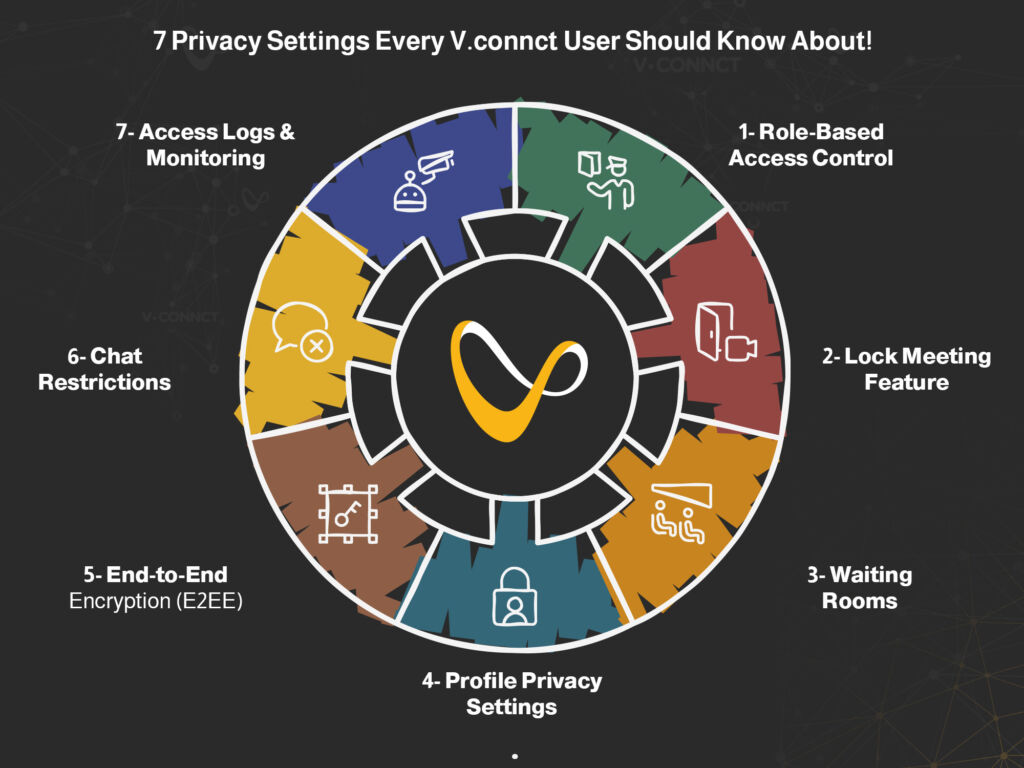
  • 7 Privacy Settings Every V.connct User Should !Know About

    7 Privacy Settings Every V.connct User Should !Know About

    Whether you’re hosting high-stakes business meetings or virtual classrooms, the ability to control who joins, what they see, and how they interact is essential. V.connct was designed with this in mind, offering robust privacy settings that empower users and admins alike. In this article, we’ll walk you through 7 powerful privacy settings in V.connct that help you create safer, more controlled virtual spaces without compromising collaboration or ease of use.

    Privacy Settings

    1. Role-Based Access Control

    Assign roles like Moderator, Presenter, or Viewer to limit who can share screens, speak, or invite others. This keeps the meeting structure intact and prevents misuse.

     2. Lock Meeting Feature

    Once a meeting begins, hosts can lock it, preventing anyone else from joining, even if they have the link.

    3. Waiting Rooms

    Meetings can begin with a waiting room, giving hosts time to vet and approve attendees before admitting them.

    4. Profile Privacy Settings

    Control how much profile information is visible to others. Users can hide details like email or full name, ideal for external meetings.

     5. End-to-End Encryption (E2EE)

    All messages, files, and video streams are encrypted from sender to receiver, ensuring no unauthorized access, including from V.connct itself.

    6. Chat Restrictions

    Moderators can restrict who can chat, when, and whether private messaging is allowed. This prevents misuse or distractions during sessions.

     7. Access Logs & Monitoring

    Admins have access to detailed logs of join/leave activity and role changes, helping them audit usage and identify issues in real time.

    Security begins with awareness. These 7 privacy settings give you full control over how your meetings are run, who participates, and how data is shared.

    Try V.connct for Free or Book a Demo today to explore these features in action.

  • التشفير من الطرف إلى الطرف في V.connct: لماذا هو مهم؟

    التشفير من الطرف إلى الطرف في V.connct: لماذا هو مهم؟

    في عصر تتزايد فيه مخاطر اختراق البيانات والمراقبة، أصبحت حماية محادثات فريقك أولوية قصوى. وقد تم تطوير منصة V.connct بناءً على مبدأ الخصوصية أولًا، ويُعد التشفير من الطرف إلى الطرف أحد الركائز الأساسية لهذا النهج.

    إليك كيف يعمل ولماذا هو ضروري لمؤسستك.

    ما هو التشفير من الطرف إلى الطرف؟

    1. ما هو التشفير من الطرف إلى الطرف؟

    التشفير من الطرف إلى الطرف يعني أن محتوى الاجتماع، بما في ذلك الفيديو والصوت والرسائل والملفات، يتم تشفيره على جهاز المرسل ولا يُفك تشفيره إلا على جهاز المستلم. لا يمكن لأي جهة، بما في ذلك V.connct نفسها، الاطلاع على البيانات أثناء نقلها أو تخزينها.

    وهذا يختلف عن التشفير التقليدي الذي قد يتيح لمزود الخدمة إمكانية الوصول إلى البيانات.

    2. كيف تطبق V.connct التشفير من الطرف إلى الطرف (E2EE)

    •  توليد المفاتيح على مستوى الجهاز
      يتم توليد مفاتيح تشفير فريدة لكل جلسة مباشرة على أجهزة المستخدمين، ولا يتم إرسالها أو تخزينها على خوادم V.connct أبدًا.
    •  تبادل المفاتيح عبر قنوات مشفرة
      يتم تبادل المفاتيح عبر بروتوكولات تشفير آمنة تضمن أن المشاركين الموثوقين فقط يمكنهم الانضمام إلى الاجتماع المشفر.
    •  تشفير الرسائل والملفات
      إلى جانب الفيديو والصوت، يتم أيضًا تشفير الرسائل والملفات المشتركة من الطرف إلى الطرف لضمان السرية التامة.

    3. لماذا هذا مهم لفريقك؟

    •  ضمان الخصوصية: سواء كنت تناقش سجلات طبية، أو خطط عمل، أو بيانات طلاب، تظل محادثاتك محمية.
    •  الامتثال للوائح: يساعد E2EE في V.connct المؤسسات على الالتزام بالقوانين مثل GDPR وHIPAA.
    •  بناء الثقة: المحادثات المشفرة تعزز ثقة العملاء والشركاء والموظفين في أمان التواصل.

    4. التشفير من الطرف إلى الطرف قيد التطبيق: ميزات داعمة في V.connct

    • غرف جانبية مشفرة
    • تحكم في صلاحيات المشاركة حسب الدور
    • صلاحيات دخول عن طريق روابط مؤقتة وتوثيق الدعوات
    • لا يتم فك التشفير على الخوادم في أي مرحلة

    5. التزامنا بأمان التواصل

    في V.connct، الأمان ليس خيارًا إضافيًا، بل أساس كل تطوير. يتم التركيز على الأداء وسهولة الاستخدام في كل تحديث، حتى يتمكن فريقك من التعاون بثقة دون التنازل عن الخصوصية.

    جرب نظام V.connct الآمن الآن

    من الاجتماعات المشفرة إلى أدوات التعاون التي تركز على الخصوصية، تقدم V.connct كل ما تحتاجه لحماية تواصلك.

    جرّب V.connct مجانًا أو احجز عرضًا توضيحيًا مع فريقنا اليوم.

  • Top 5 Bug Fixes from V.connct That Boost Forecast Accuracy

    Top 5 Bug Fixes from V.connct That Boost Forecast Accuracy

    At V.connct, we know that small bugs can lead to big disruptions, especially when it comes to planning meetings, scheduling calls, or forecasting team activities. That’s why we’re continuously improving our system to ensure every feature delivers with precision. In our most recent set of releases, we addressed critical bugs that were affecting forecast reliability and user experience.

    Let’s take a closer look at what’s been fixed and how it directly improves your team’s performance and planning.

    Key Bug Fixes That Enhance Forecast Accuracy

     1. Mobile Fixes for Time Zone Drift

    Release: Mobile App v8.0.7
    Bug fixes in how meeting times were displayed across devices now ensure consistent time zone handling. This is crucial for teams scheduling cross-region sessions or forecasting availability windows accurately.

     2. Web App Speed & Data Sync Fixes

    Release: Website v6.2.0
    Inaccurate loading of meeting statistics and user engagement data has been resolved. This enables more reliable dashboards and historical reports, improving forecast precision.

     3. AI Prediction Engine Optimization

    Release: Desktop v3.0 Update
    Bug fixes within the new engine have resolved incorrect session pattern calculations. This update improves how the system interprets past behaviors for smarter future scheduling and analytics.

    4. Dashboard Display Corrections

    User-reported issues like metrics misalignment or broken graphs have been addressed, ensuring better visualization of key data points used for forecasting attendance, usage trends, or workload.

    5. Data Export Reliability

    Several bugs in CSV/Excel export across platforms were fixed, ensuring accurate data extraction for offline analysis or strategic planning.

    Why This Matters to You

    Whether you’re managing workforce schedules, preparing executive meetings, or analyzing product adoption, precision matters. These bug fixes ensure that:

    • Your team gets the right time, every time
    • Dashboard metrics reflect real user data
    • Meeting stats support accurate forecasting
    • Mobile reliability matches desktop power
    bug fixes
    bug fixes

    Try the New V.connct Today

    We’re constantly improving to help you plan better and scale faster.
    Explore the upgraded platform and see how the new fixes can enhance your team’s performance.

    Try V.connct for Free or Book a Demo

  • 5 إصلاحات الأخطاء من V.connct حسّنت التخطيط المستقبلي بدقة أعلى

    5 إصلاحات الأخطاء من V.connct حسّنت التخطيط المستقبلي بدقة أعلى

    في V.connct، نعلم أن الأخطاء الصغيرة قد تسبب اضطرابات كبيرة، خصوصًا عند تخطيط الاجتماعات، أو جدولة المهام، أو توقع نشاط الفرق. ولهذا نعمل باستمرار على تحسين النظام من خلال تنفيذ إصلاحات الأخطاء لضمان أن كل ميزة تعمل بأقصى دقة. في أحدث الإصدارات، قمنا بحل عدد من المشكلات الجوهرية التي أثرت على دقة التخطيط المستقبلي وتجربة المستخدم.

    دعونا نستعرض أبرز هذه الإصلاحات وكيف أثرت بشكل مباشر على أداء الفرق وتحسين التخطيط.

    أهم إصلاحات الأخطاء التي حسنت دقة التخطيط المستقبلي

    1. إصلاحات التطبيق الموبايل الخاصة بفروقات المناطق الزمنية

    الإصدار: تطبيق الموبايل v8.0.7
    تم معالجة مشكلة اختلاف توقيت الاجتماعات بين الأجهزة المختلفة، مما يضمن عرض التوقيت بشكل موحد لجميع المستخدمين. وهذا أساسي للفرق التي تعمل عبر مناطق زمنية مختلفة وتحتاج إلى دقة في جدولة الاجتماعات.

    2. تحسين سرعة التطبيق على الويب ومزامنة البيانات

    الإصدار: الموقع الإلكتروني v6.2.0
    تم حل مشكلات بطء تحميل الإحصائيات أو عدم دقتها. أصبحت لوحات التحكم أكثر موثوقية، ويمكن الاعتماد على تقارير الأداء السابقة لتحسين التخطيط المستقبلي.

    3. تحسين محرك التخطيط المستقبلي المدعوم بالذكاء الاصطناعي

    الإصدار: سطح المكتب v3.0
    عالجنا خللاً في طريقة احتساب أنماط الجلسات داخل المحرك الجديد. ساعد هذا التحديث النظام على فهم السلوكيات السابقة بشكل أفضل وتقديم جداول مستقبلية وتحليلات أكثر دقة.

     4. تصحيح عرض البيانات على لوحة التحكم

    تم حل مشكلات تتعلق بعدم توافق المؤشرات أو تلف الرسوم البيانية، ما يتيح عرضًا أوضح للنقاط البيانية الرئيسية المستخدمة في تحليل الحضور واستخدام النظام وأعباء العمل.

    5. تحسين موثوقية تصدير البيانات

    تم إصلاح عدد من مشكلات تصدير الملفات بصيغة CSV/Excel، مما يضمن استخراج بيانات دقيقة لتحليلها أو استخدامها في تقارير خارجية.

    لماذا يهمك هذا؟

    سواء كنت تدير جداول فرق العمل، أو تحضر اجتماعات إدارية، أو تحلل استخدام منتجك، فإن الدقة أمر لا يمكن التهاون فيه. هذه الإصلاحات تضمن أن:

    •  فريقك يحصل على التوقيت الصحيح دائمًا
    •  مؤشرات لوحة التحكم تعكس بيانات حقيقية
    •  بيانات الاجتماعات تدعم التخطيط المستقبلي الدقيق
    •  أداء التطبيق على الموبايل يعادل قوة سطح المكتب
    إصلاحات الأخطاء
    إصلاحات الأخطاء

    جرب V.connct الآن!

    نحن نواصل العمل على تطوير المنصة لمساعدتك في التخطيط الأفضل والنمو الأسرع.
    استكشف النسخة المحدثة وشاهد بنفسك كيف تعزز هذه الإصلاحات من أداء فريقك.

     جرب V.connct مجانًا أو احجز جلسة تجريبية مع فريقن