التصنيف: Online Meetings

  • Upgrade Your Talent Hunt: Mastering Virtual Interviews in 2024

    Upgrade Your Talent Hunt: Mastering Virtual Interviews in 2024

    From Awkward Encounters to Engaging Experiences – HR’s Guide to Successful Virtual Interviews

    The global shift towards remote work has made virtual interviews the new normal. While convenient and cost-effective, they can also present challenges in creating a positive candidate experience and accurately assessing abilities. This article equips HR professionals with three key strategies to master virtual interviews in 2024:

    1. Design for Connection, Not Just Convenience:

    • Pre-Interview Prep: Establish clear instructions, test technology beforehand, and encourage a professional environment for both parties.
    • Start with Rapport: Initiate small talk, personalize questions, and foster a conversational atmosphere to put candidates at ease.
    • Interactive Engagement: Utilize screen sharing, whiteboards, or breakout rooms to encourage active participation and showcase company culture.

    2. Go Beyond Basic Questions: Assess for Potential, Not Perfection:

    • Structure Matters: Develop standardized interview questions and scoring rubrics for consistent evaluation.
    • Focus on Behaviors, Not Just Skills: Leverage behavioral interviewing techniques to predict future performance based on past experiences.
    • Embrace Diversity: Create inclusive interview panels and questions to attract diverse talent and build a well-rounded team.

    3. Feedback & Leave a Lasting Impression:

    • Provide Timely Feedback: Share constructive feedback, regardless of the outcome, to showcase professionalism and transparency.
    • Clearly Communicate Next Steps: Outline the process, potential timelines, and any action items to manage candidate expectations.
    • Nurture Relationships: Stay connected with promising candidates, even if not an immediate fit, to build a talent pipeline for future needs.

    Remember, successful virtual interviews go beyond the technology. By prioritizing human connection, data-driven assessments, and a well-defined process, you can attract top talent and build a strong employer brand the digital world.

  • Advantages of Online Seminars

    Advantages of Online Seminars

    Online seminars, also known as webinars, offer several advantages over traditional in-person seminars. Here are some of the key benefits for both organizers and participants:

    For Organizers:

    • Cost savings: There’s no need to rent a venue or cover travel and accommodation costs for speakers and guests, making it a more cost-effective option.
    • Wider reach: Speakers and guests can attend the webinar from anywhere in the world, increasing the potential reach of the event.
    • Recording and editing: Webinars can be recorded and viewed later by those who couldn’t attend live, adding value to the educational content.
    • Enhanced engagement: Many online platforms offer interactive features such as chat, Q&A, and polling, allowing participants to engage more deeply with the content.
    • Ease of management and organization: Online seminars can be managed and organized more easily than traditional seminars, with various tools and technologies available to assist.

    For Participants:

    • Convenience and flexibility: Participants can attend the webinar from the comfort of their homes or offices, saving them time and effort.
    • Time and cost savings: There’s no need to travel or incur travel and accommodation costs, saving participants time and money.
    • Rewatch ability: Participants can rewatch the recorded webinar at any time, allowing them to review and solidify the educational content.
    • Access to experts: Participants can access and learn from experts from all over the world.
    • Interaction and participation: Participants can interact with speakers and other guests through the interactive features provided by online platforms.

    Additional Benefits:

    • Environmental protection: Online seminars reduce carbon emissions and other greenhouse gas emissions associated with travel.
    • Accessibility for people with disabilities: Online seminars can be more accessible to people with disabilities, as live captioning, transcripts, and other accommodations can be provided.

    Overall, online seminars offer numerous advantages for both organizers and participants, making them an appealing option for delivering and receiving educational and training information.

  • Engaging and Effective Learning with V.connct

    Engaging and Effective Learning with V.connct

    In today’s digital world, e-learning is becoming increasingly popular. And for good reason. It’s convenient, affordable, and can be just as effective as traditional classroom learning. But what’s the best e-learning tool out there?

    V.connct is a powerful video conferencing app that can be used to deliver engaging and effective educational content. It offers a variety of features that can be used to create interactive and collaborative learning experiences for students of all ages.

    Here are just a few of the ways that V.connct can be used in the education industry:

    • Live online classes: V.connct can be used to deliver live online classes to students anywhere in the world. Teachers can use the app to share their screen, whiteboard, and audio with students. They can also use the app to conduct polls and quizzes, and to lead group discussions.
    • Recorded lectures and tutorials: Teachers can record their lectures and tutorials using V.connct and share them with students to review at their own pace. This can be especially helpful for students who need additional support or who missed a class.
    • Office hours and one-on-one tutoring: Teachers can use V.connct to hold office hours and provide one-on-one tutoring to students. This is a great way for students to get personalized help with their coursework.
    • Collaborative projects: V.connct can be used to facilitate collaborative projects between students. Students can use the app to share files, work on projects together in real time, and communicate with each other easily.
    • Parent-teacher conferences: V.connct can be used to hold parent-teacher conferences online. This can be a convenient way for parents and teachers to meet and discuss student progress, especially if the parent is unable to attend a meeting in person.

    Engaging Features of V.connct in “Meet and classroom”

    V.connct offers a number of engaging features that can make meetings less boring and more effective than other meeting apps. Some of these features include:

    • Whiteboard: The whiteboard feature allows participants to draw diagrams, solve problems, and brainstorm ideas together in real time.
    • Screen sharing: The screen sharing feature allows participants to share presentations, videos, and other educational resources with each other.
    • Polls and questionnaires: The polls and questionnaires feature allow teachers to create and conduct polls and quizzes with students during live classes.
    • Meeting recording and download: The meeting recording and download feature allows teachers to record their lectures and tutorials and share them with students to review at their own pace.
    • Participant state: is an important metric to track in meetings. It can be used to measure the engagement and attention of the meeting participants.
    • Car mode: Car Mode can be used to attend online classes or lectures while driving. This can be a great way to learn new things while you are commuting or on a road trip.
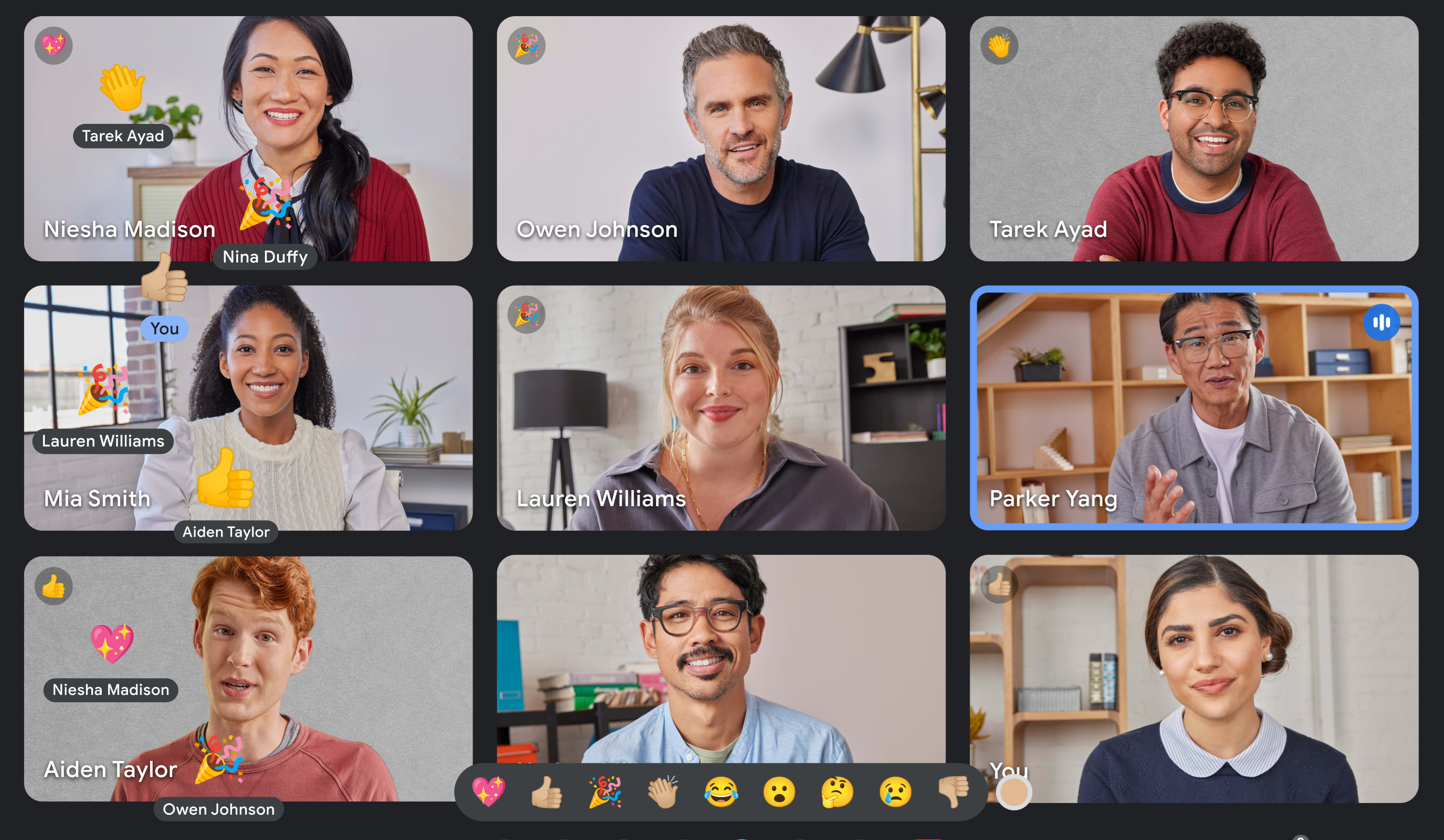
    • Emojis: Emojis can help to make meetings more engaging and fun, especially for remote participants, Emojis can be used to clarify the tone of a message, which can be helpful in avoiding misunderstandings. For example, a smiley face emoji can be used to indicate that a message is meant to be friendly and casual.
    • Chatting: Chat allows people to participate without having to raise their hand and wait to be called on. This is especially important for shy or introverted people. Chat can be used to ask questions, clarify points, and share ideas without interrupting the speaker. This helps to keep the meeting moving forward and prevents it from going off on tangents.
    • Virtual background: It allows teachers to change the background of their virtual classroom or presentation to any image, which can help to capture students’ attention and make learning more fun and interactive.

    If you’re looking for an easy-to-use e-learning tool that can help you deliver engaging and effective educational content, then V.connct is the perfect solution for you. Sign up for a free trial today and see how V.connct can help you transform your teaching and learning experience.

    Ready to take your business collaboration to new heights? Visit www.vconnct.me and download our Application.


  • Emojis in Meetings: More Than Just Fun and Games

    Emojis in Meetings: More Than Just Fun and Games

    Emojis are often seen as informal and playful, but they can also be a valuable tool for communication in the workplace, including in meetings. Emojis can help to convey tone and emotion, which can be difficult to do in text-based communication. They can also help to make meetings more engaging and fun.

    Here are some of the benefits of using emojis in meetings:

    • Express emotions: Emojis can be used to express a wide range of emotions, from happiness and excitement to sadness and frustration. This can help to make meetings more personal and human.
    • Clarify tone: Emojis can be used to clarify the tone of a message, which can be helpful in avoiding misunderstandings. For example, a smiley face emoji can be used to indicate that a message is meant to be friendly and casual.
    • Make meetings more engaging: Emojis can help to make meetings more engaging and fun, especially for remote participants. They can also be used to break the ice and create a more relaxed atmosphere.

    Here are some tips for using emojis in meetings effectively:

    • Use emojis sparingly. Too many emojis can be distracting and unprofessional.
    • Choose emojis that are appropriate for the context of the meeting. For example, you wouldn’t want to use a lot of playful emojis in a serious meeting.
    • Be aware of the cultural differences in emoji use. Not all emojis are interpreted the same way in all cultures.

    Next time you’re in a meeting, try using an emoji or two to see how they can improve the communication and engagement of your team.

    Ready to take your business collaboration to new heights? Visit www.vconnct.me and download our Application.

  • Introducing Car Mode in V.connct

    Introducing Car Mode in V.connct

    Car Mode feature is a simplified interface that is optimized for use in a car. The interface is larger and easier to read, and the controls are larger and easier to tap. so, you can control V.connct Meet without having to take your hands off the wheel.

    Car Mode is a great way to stay connected with your team while you’re on the road.

    Here are some of the benefits of using Car Mode in V.connct:

    • Safer: Car Mode is designed to be used while driving, so you can focus on the road and avoid distractions.
    • Easier to use: Car Mode has a simplified interface and larger controls, making it easier to use while driving.
    • Multi-tasking: V.connct Car Mode allows you to multi-task while driving. For example, you can listen to a meeting while navigating to your destination.
    • Do Not Disturb mode: V.connct Car Mode includes a Do Not Disturb mode that can be enabled to block incoming calls and notifications. This can help you to stay focused on the road and avoid distractions.

    V.connct Car Mode can be used for a variety of purposes, including:

    • Business meetings: V.connct Car Mode is a great way to stay connected with your team while you are on the road. You can use Car Mode to join and leave meetings, mute and unmute yourself, and control your camera. You can also use Car Mode to chat with other meeting participants.
    • Education: V.connct Car Mode can be used to attend online classes or lectures while driving. This can be a great way to learn new things while you are commuting or on a road trip.
    • Socializing: V.connct Car Mode can be used to stay connected with friends and family while driving. You can use Car Mode to join and leave video calls, mute and unmute yourself, and control your camera. You can also use Car Mode to chat with other call participants.

    Overall, V.connct Car Mode is a versatile and powerful tool that can be used for a variety of purposes. It is a great way to stay connected with your team, learn new things, and socialize with friends and family while you are on the road.

    V.connct Car Mode is available now on the App Store and Google Play.

    Ready to take your business collaboration to new heights? Visit www.vconnct.me and download our Application.
  • The V.connct Superapp Chat Feature: Your Secret Weapon for Success

    The V.connct Superapp Chat Feature: Your Secret Weapon for Success

    The V.connct Superapp chat feature is more than just a way to stay connected with friends and family. It’s a powerful tool that can be used to improve your personal and professional life.

    Here are some best practices for using the V.connct Superapp chat feature:

    • Be clear and concise in your messages. People are busy, so they appreciate it when you get straight to the point. Avoid using jargon or abbreviations that the other person may not understand.
    • Use proper grammar and spelling. This shows that you put effort into your messages and that you respect the other person’s time.
    • Be polite and respectful. Remember that you are communicating with a real person, not a bot. Be mindful of your tone and language, and avoid making personal attacks.
    • Use emojis sparingly. Emojis can be a fun way to add personality to your messages, but don’t overuse them. A few well-placed emojis can go a long way, but too many can be distracting and unprofessional.
    • Proofread your messages before sending them. This will help to catch any errors in grammar or spelling.

    Here are some ways that the V.connct Superapp chat feature can be useful for individuals and professionals:

    • Individuals:
      • Stay connected with friends and family: The V.connct Superapp chat feature is a great way to stay in touch with friends and family members who live far away. You can send text messages, photos, and videos, and even make video calls.
      • Get support from businesses: Many businesses now offer customer support through the V.connct Superapp chat feature. This can be a convenient way to get help with a product or service, or to resolve an issue.
      • Meet new people: The V.connct Superapp chat feature can also be used to meet new people. There are many groups and communities on the app where you can connect with people who share your interests.
    • Professionals:
      • Collaborate with colleagues: The V.connct Superapp chat feature is a great way to collaborate with colleagues on projects. You can share files, send messages, and even have video calls.
      • Network with other professionals: The V.connct Superapp chat feature can also be used to network with other professionals. There are many groups and communities on the app where you can connect with people in your field.
      • Provide customer support: Businesses can use the V.connct Superapp chat feature to provide customer support to their customers. This can be a convenient way to answer questions and resolve issues.

    Overall, the V.connct Superapp chat feature is a versatile and powerful tool that can be used for a variety of purposes. By following the best practices above, you can ensure that you are using the chat feature effectively and respectfully.

    Ready to take your business collaboration to new heights? Visit www.vconnct.me and download our Application.

  • How to Give Moderators More Control Over Meetings

    How to Give Moderators More Control Over Meetings

    Moderators play an important role in ensuring that meetings are productive and efficient. Additional features that can be given to moderators can help them to have more control over the meeting and to keep it on track.

    If you’re responsible for planning meetings, consider giving the moderator some additional features to help them have more control. This will make the meetings more productive and efficient for everyone involved.

    Here are some examples of additional features that can be given to the moderator:

    • Share a specific application: The moderator can share a specific application with the meeting participants, such as a presentation, a document, or a video.
    • Share a specific tab: The moderator can share a specific tab from their web browser with the meeting participants.
    • Share a region of the screen: The moderator can share a specific region of their screen with the meeting participants, such as a specific window or a specific area of a document.
    • Allow participants to annotate the shared screen: The moderator can allow participants to annotate the shared screen, such as by drawing on it or typing on it in the “Application”.
    • Control the whiteboard: The moderator can control the whiteboard, such as by adding and removing objects, moving objects, and drawing on the whiteboard.
    • Allow participants to contribute to the whiteboard: The moderator can allow participants to contribute to the whiteboard, such as by adding and removing objects, moving objects, and drawing on the whiteboard.
    • Save the whiteboard: The moderator can save the whiteboard so that it can be used in future meetings or shared with participants who were unable to attend the meeting live.

    These features can be helpful for a variety of purposes, such as:

    • Giving presentations: The moderator can share their screen to give a presentation to the meeting participants.
    • Collaborating on documents: The moderator can share their screen or a specific application to collaborate on a document with the meeting participants.
    • Brainstorming ideas: The moderator can share the whiteboard to brainstorm ideas with the meeting participants.
    • Solving problems: The moderator can share the whiteboard to solve problems with the meeting participants.
    • Making decisions: The moderator can share the whiteboard to make decisions with the meeting participants.

    By giving the moderator these additional features, you can help them to make meetings more productive and engaging for everyone involved. This will make the meetings more productive and efficient for everyone involved.

    Ready to take your business collaboration to new heights? Visit www.vconnct.me and download our Application.

  • The Importance of Participant State

    The Importance of Participant State

    Participant state is an important metric to track in meetings. It can be used to measure the engagement and attention of the meeting participants.

    There are a few different ways to track participant state, such as:

    • Activity: This could include things like whether the participant is talking, listening, or chatting.
    • Engagement: This could include things like whether the participant is asking questions, contributing to the discussion, or reacting to the conversation.

    Tracking participant state can be helpful for a number of reasons. For example, it can be used:

    • To identify disengaged participants: If a participant is not engaged in the meeting, the moderator may want to take steps to get them more involved.
    • To assess the effectiveness of the meeting: If the participant state is low, it may be a sign that the meeting is not engaging or productive.
    • To improve the meeting experience for all participants: By tracking participant state, the moderator can make adjustments to the meeting to ensure that everyone is engaged and participating.

    There are a number of different ways to improve the meeting experience for all participants, such as:

    • Encourage participation: Ask questions and encourage participants to share their thoughts and ideas.
    • Use a variety of activities: Keep the meeting interesting and engaging by using a variety of activities, such as presentations, discussions, and breakout sessions.
    • Take breaks: Give participants breaks to rest and recharge.
    • Be mindful of time: Keep the meeting on track and end it on time.

    By tracking participant state and making adjustments to the meeting experience, you can create more productive and engaging meetings for everyone.

    Ready to take your business collaboration to new heights? Visit www.vconnct.me and download our Application.

  • Group calling was not more easy

    Group calling was not more easy

    Superapp group calls are a great way to stay in touch with your friends and family, especially if you live far away from each other. They’re also a great way to collaborate on projects or simply have a group chat.

    Superapp group calls, allow you to have video and audio calls with up to 8 people at once. Group calls are end-to-end encrypted, so you can be sure that your conversations are private.

    • Video and audio calls: Superapp  group calls support both video and audio calls, so you can choose the format that best suits your needs.
    • Screen sharing: You can share your screen with other participants in a Superapp  group call, which can be useful for presentations, collaboration, or simply showing off something cool.
    • Noise cancellation: Superapp  group calls use noise cancellation to reduce background noise, so you can hear everyone clearly.

    Usage:

    • Stay in touch with friends and family: Superapp  group calls are a great way to stay in touch with your friends and family, especially if you live far away from each other. You can use Superapp  group calls to video chat, have a group audio call, or even just have a screen sharing session.
    • Collaborate on projects: Superapp  group calls can also be used to collaborate on projects with colleagues or classmates. You can use Superapp  group calls to share ideas, brainstorm solutions, or even just work on a project together in real time.
    • Have a group chat: Superapp  group calls can also be used to simply have a group chat with your friends and family. You can use Superapp  group calls to catch up, talk about your day, or just have some fun together.

    Here are some specific examples of how you can use Superapp  group calls

    • Have a weekly family video call: If you have family members who live far away, you can use Superapp  group calls to have a weekly video call so that you can stay in touch and see each other’s faces.
    • Collaborate on a school project: If you have a school project that you’re working on with a group of classmates, you can use Superapp  group calls to collaborate on the project together in real time. You can use Superapp  group calls to share ideas, brainstorm solutions, and even work on the project together.
    • Have a game night with friends: If you enjoy playing online games with your friends, you can use Superapp  group calls to have a game night together. You can use Superapp  group calls to voice chat while you’re playing, and you can even share your screen so that your friends can watch you play.

    No matter how you choose to use them, Superapp  group calls are a great way to stay connected with the people you care about.

    Ready to take your business collaboration to new heights? Visit www.vconnct.me and download our Application.

  • Superapp the Future of All-in-One Productivity for everyone

    Superapp the Future of All-in-One Productivity for everyone

    Imagine having a single app that could handle all of your needs, from chatting and meeting with colleagues to managing your calendar and tasks to providing access to a wide range of services. That’s the beauty of Superapp, which are all-in-one platforms that are quickly becoming essential tools for everyone in all industries.

    Superapp offer a number of advantages for you, including:

    • Convenience: Superapp save time and hassle by providing access to a wide range of services from a single app. This can be especially beneficial for busy professionals who need to juggle multiple tasks and responsibilities.
    • Efficiency: Superapp can help professionals to be more efficient by automating tasks and streamlining workflows. For example, a Superapp could automatically generate meeting notes or send reminders about upcoming deadlines.
    • Collaboration: Superapp can facilitate collaboration by providing a central platform for teams to communicate and share files. This can be especially helpful for remote teams or teams that work across multiple time zones.

    Use of Superapp in different industries:

    • Healthcare: Superapp can be used to provide patients with access to a variety of healthcare services, such as scheduling appointments, reviewing medical records, and communicating with doctors and other healthcare professionals.
    • Education: Superapp can be used to provide students with access to educational resources, such as online courses, textbooks, and study materials. Superapp can also be used to facilitate communication between students, teachers, and parents.
    • Finance: Superapp can be used to provide customers with access to a variety of financial services, such as banking, investing, and insurance.
    • Retail: Superapp can be used to provide customers with a one-stop shop for shopping, including product discovery, price comparison, and checkout. Superapp can also be used to facilitate deliveries and returns.

    Superapp are still in their early stages of development, but they have the potential to revolutionize the way that professionals work. By providing a single platform for all of your professional needs, Superapp can help you to be more efficient, productive, and collaborative.

    Ready to take your business collaboration to new heights? Visit www.vconnct.me and download our Application.