
Blog

  • Engaging and Effective Learning with V.connct

    Engaging and Effective Learning with V.connct

    In today’s digital world, e-learning is becoming increasingly popular. And for good reason. It’s convenient, affordable, and can be just as effective as traditional classroom learning. But what’s the best e-learning tool out there?

    V.connct is a powerful video conferencing app that can be used to deliver engaging and effective educational content. It offers a variety of features that can be used to create interactive and collaborative learning experiences for students of all ages.

    Here are just a few of the ways that V.connct can be used in the education industry:

    • Live online classes: V.connct can be used to deliver live online classes to students anywhere in the world. Teachers can use the app to share their screen, whiteboard, and audio with students. They can also use the app to conduct polls and quizzes, and to lead group discussions.
    • Recorded lectures and tutorials: Teachers can record their lectures and tutorials using V.connct and share them with students to review at their own pace. This can be especially helpful for students who need additional support or who missed a class.
    • Office hours and one-on-one tutoring: Teachers can use V.connct to hold office hours and provide one-on-one tutoring to students. This is a great way for students to get personalized help with their coursework.
    • Collaborative projects: V.connct can be used to facilitate collaborative projects between students. Students can use the app to share files, work on projects together in real time, and communicate with each other easily.
    • Parent-teacher conferences: V.connct can be used to hold parent-teacher conferences online. This can be a convenient way for parents and teachers to meet and discuss student progress, especially if the parent is unable to attend a meeting in person.

    Engaging Features of V.connct in “Meet and classroom”

    V.connct offers a number of engaging features that can make meetings less boring and more effective than other meeting apps. Some of these features include:

    • Whiteboard: The whiteboard feature allows participants to draw diagrams, solve problems, and brainstorm ideas together in real time.
    • Screen sharing: The screen sharing feature allows participants to share presentations, videos, and other educational resources with each other.
    • Polls and questionnaires: The polls and questionnaires feature allow teachers to create and conduct polls and quizzes with students during live classes.
    • Meeting recording and download: The meeting recording and download feature allows teachers to record their lectures and tutorials and share them with students to review at their own pace.
    • Participant state: is an important metric to track in meetings. It can be used to measure the engagement and attention of the meeting participants.
    • Car mode: Car Mode can be used to attend online classes or lectures while driving. This can be a great way to learn new things while you are commuting or on a road trip.
    • Emojis: Emojis can help to make meetings more engaging and fun, especially for remote participants, Emojis can be used to clarify the tone of a message, which can be helpful in avoiding misunderstandings. For example, a smiley face emoji can be used to indicate that a message is meant to be friendly and casual.
    • Chatting: Chat allows people to participate without having to raise their hand and wait to be called on. This is especially important for shy or introverted people. Chat can be used to ask questions, clarify points, and share ideas without interrupting the speaker. This helps to keep the meeting moving forward and prevents it from going off on tangents.
    • Virtual background: It allows teachers to change the background of their virtual classroom or presentation to any image, which can help to capture students’ attention and make learning more fun and interactive.

    If you’re looking for an easy-to-use e-learning tool that can help you deliver engaging and effective educational content, then V.connct is the perfect solution for you. Sign up for a free trial today and see how V.connct can help you transform your teaching and learning experience.

    Ready to take your business collaboration to new heights? Visit www.vconnct.me and download our Application.

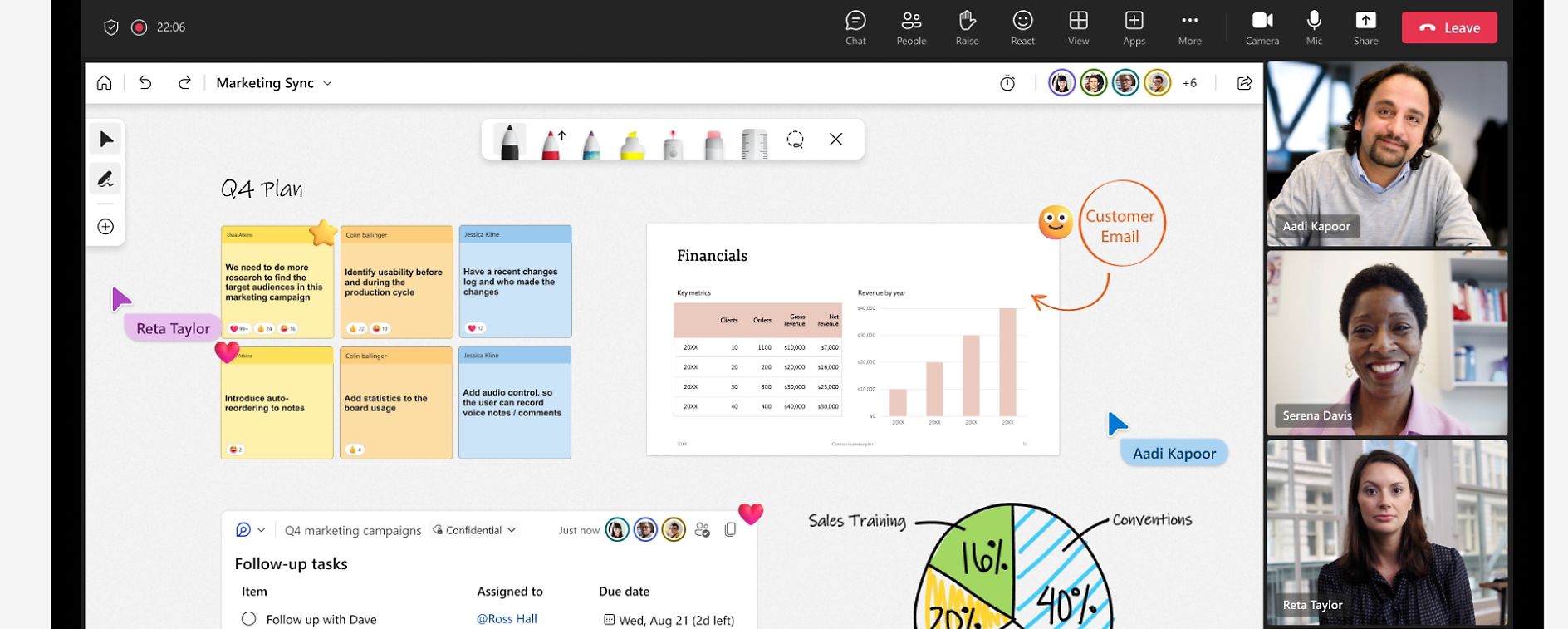
  • الرموز التعبيرية في الاجتماعات: أكثر من مجرد متعة وألعاب

    الرموز التعبيرية في الاجتماعات: أكثر من مجرد متعة وألعاب

    غالبا ما ينظر إلى الرموز التعبيرية على أنها غير رسمية ومرحة ، ولكنها يمكن أن تكون أيضا أداة قيمة للتواصل في مكان العمل ، بما في ذلك في الاجتماعات. يمكن أن تساعد الرموز التعبيرية في نقل النغمة والعاطفة ، والتي قد يكون من الصعب القيام بها في التواصل النصي. يمكنهم أيضا المساعدة في جعل الاجتماعات أكثر جاذبية ومتعة.

    فيما يلي بعض فوائد استخدام الرموز التعبيرية في الاجتماعات:

    • التعبير عن المشاعر: يمكن استخدام الرموز التعبيرية للتعبير عن مجموعة واسعة من المشاعر ، من السعادة والإثارة إلى الحزن والإحباط. هذا يمكن أن يساعد في جعل الاجتماعات أكثر شخصية وإنسانية.
    • توضيح النغمة: يمكن استخدام الرموز التعبيرية لتوضيح نبرة الرسالة ، والتي يمكن أن تكون مفيدة في تجنب سوء الفهم. على سبيل المثال ، يمكن استخدام رمز تعبيري للوجه المبتسم للإشارة إلى أن الرسالة تهدف إلى أن تكون ودية وغير رسمية.
    • اجعل الاجتماعات أكثر جاذبية: يمكن أن تساعد Emojis في جعل الاجتماعات أكثر جاذبية ومتعة ، خاصة للمشاركين عن بعد. يمكن استخدامها أيضا لكسر الجليد وخلق جو أكثر استرخاء.

    فيما يلي بعض النصائح لاستخدام الرموز التعبيرية في الاجتماعات بشكل فعال:

    • استخدم الرموز التعبيرية باعتدال. الكثير من الرموز التعبيرية يمكن أن تكون مشتتة وغير مهنية.
    • اختر الرموز التعبيرية المناسبة لسياق الاجتماع. على سبيل المثال ، لن ترغب في استخدام الكثير من الرموز التعبيرية المرحة في اجتماع جاد.
    • كن على دراية بالاختلافات الثقافية في استخدام الرموز التعبيرية. لا يتم تفسير جميع الرموز التعبيرية بنفس الطريقة في جميع الثقافات.

    في المرة القادمة التي تكون فيها في اجتماع ، حاول استخدام رمز تعبيري أو اثنين لمعرفة كيف يمكنهم تحسين التواصل والمشاركة لفريقك.

    زر موقعنا الرسمي vconnct.me و حمل التطبيق الان

  • Emojis in Meetings: More Than Just Fun and Games

    Emojis in Meetings: More Than Just Fun and Games

    Emojis are often seen as informal and playful, but they can also be a valuable tool for communication in the workplace, including in meetings. Emojis can help to convey tone and emotion, which can be difficult to do in text-based communication. They can also help to make meetings more engaging and fun.

    Here are some of the benefits of using emojis in meetings:

    • Express emotions: Emojis can be used to express a wide range of emotions, from happiness and excitement to sadness and frustration. This can help to make meetings more personal and human.
    • Clarify tone: Emojis can be used to clarify the tone of a message, which can be helpful in avoiding misunderstandings. For example, a smiley face emoji can be used to indicate that a message is meant to be friendly and casual.
    • Make meetings more engaging: Emojis can help to make meetings more engaging and fun, especially for remote participants. They can also be used to break the ice and create a more relaxed atmosphere.

    Here are some tips for using emojis in meetings effectively:

    • Use emojis sparingly. Too many emojis can be distracting and unprofessional.
    • Choose emojis that are appropriate for the context of the meeting. For example, you wouldn’t want to use a lot of playful emojis in a serious meeting.
    • Be aware of the cultural differences in emoji use. Not all emojis are interpreted the same way in all cultures.

    Next time you’re in a meeting, try using an emoji or two to see how they can improve the communication and engagement of your team.

    Ready to take your business collaboration to new heights? Visit www.vconnct.me and download our Application.
  • سهولة التفاعل مع السبورة في V.connct

    سهولة التفاعل مع السبورة في V.connct

    هل تكافح من أجل شرح شيء لشخص ما؟ إذا كانت الصورة تساوي ألف كلمة ، فماذا عن الرسم التخطيطي؟ نحن متحمسون لتعريفك بالسبورة البيضاء في V.connct Meet ، القطعة المفقودة لجميع أولئك الذين يبحثون عن حل اجتماع تعليمي والمزيد!

    السبوة البيضاء في V.connct Meet ، وهي ميزة تتيح للمستخدمين التعاون ومشاركة الأفكار أثناء الاجتماعات عبر الإنترنت.

    توفر السبوةر البيضاء V.connct عددا من المزايا ، بما في ذلك:

    • سهولة الاستخدام: يمكن للمستخدمين إنشاء السبورة البيضاء ومشاركتها بسرعة وسهولة.
    • التعاون في الوقت الفعلي:  يمكن للمستخدمين العمل معا على السبورة البيضاء في الوقت الفعلي.
    • مشاركة الأفكار: يمكن للمستخدمين استخدام السبورة البيضاء لمشاركة الأفكار والملاحظات مع بعضهم البعض.

    كيفية استخدام السبورة البيضاء V.connct

    لإنشاء لوح معلومات في V.connct، اتبع الخطوات التالية:

    • افتح تطبيق V.connct Meet.
    • ابدأ اجتماعا جديدا أو انضم إلى اجتماع حالي.
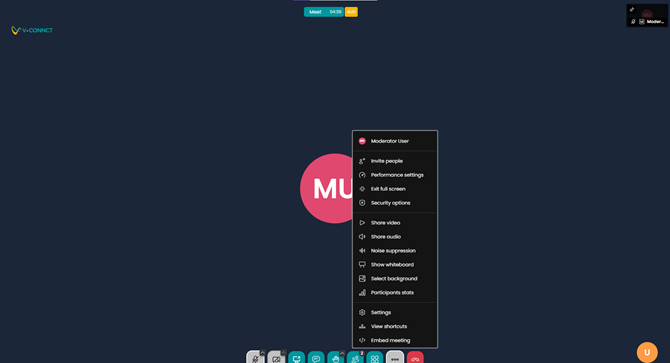
    • انقر فوق خيار السبورة البيضاء من أيقونة المزيد من الإجراءات أسفل الشاشة.
    • ابدأ الرسم أو الكتابة على السبورة البيضاء.
    • انقر فوق أيقونة المشاركة لمشاركة لوح المعلومات مع المشاركين الآخرين في الاجتماع.

    توفر واجهة السبورة البيضاء في V.connct مجموعة متنوعة من الأدوات والإعدادات لجعل التعاون جذابا وفعالا. عندما يقوم أحد المشاركين بإجراء تغييرات على لوح المعلومات محليا، يتم إرسال هذه التغييرات إلى خادم ثم توزيعها على أجهزة المشاركين الآخرين في الاجتماع. يمكن تصدير محتوى السبورة البيضاء بتنسيق PNG أو SVG في أي وقت أثناء الاجتماع ، مما يضمن عدم ضياع كل العمل الشاق.

    استخدامات السبورة البيضاء في V.connct

    يمكن استخدام السبورة البيضاء في V.connct لمجموعة متنوعة من الأغراض ، بما في ذلك:

    • التدريس: يمكن للمدرسين استخدام السبورة البيضاء لشرح الدروس أو المفاهيم للطلاب.
    • التعاون: يمكن للموظفين استخدام السبورات البيضاء للعمل معا في المشاريع.
    • العروض التقديمية: يمكن للمستخدمين استخدام ألواح المعلومات لإنشاء عروض تقديمية جذابة.

    تعد السبورة البيضاء إضافة قيمة إلى تطبيق V.connct Meet ، مما يتيح للمستخدمين التعاون ومشاركة الأفكار أثناء الاجتماعات عبر الإنترنت. لذا جربها.

    زر موقعنا الرسمي vconnct.me و حمل التطبيق الان

  • وضع السيارة في V.connct

    وضع السيارة في V.connct

    ميزة وضع السيارة هي واجهة مبسطة تم تحسينها للاستخدام في السيارة. الواجهة أكبر وأسهل في القراءة ، وعناصر التحكم أكبر وأسهل في النقر. لذلك ، يمكنك التحكم في V.connct Meet دون الحاجة إلى رفع يديك عن عجلة القيادة.

    يعد وضع السيارة طريقة رائعة للبقاء على اتصال مع فريقك أثناء وجودك على الطريق.

    فيما يلي بعض فوائد استخدام وضع السيارة في V.connct:

    • أكثر أمانا: تم تصميم وضع السيارة ليتم استخدامه أثناء القيادة ، بحيث يمكنك التركيز على الطريق وتجنب الانحرافات.
    • أسهل في الاستخدام: يتميز وضع السيارة بواجهة مبسطة وعناصر تحكم أكبر ، مما يسهل استخدامه أثناء القيادة.
    • تعدد المهام: يتيح لك وضع السيارة V.connct القيام بمهام متعددة أثناء القيادة. على سبيل المثال، يمكنك الاستماع إلى اجتماع أثناء التنقل إلى وجهتك.
    • وضع عدم الإزعاج: يتضمن وضع V.connct Car وضع عدم الإزعاج الذي يمكن تمكينه لحظر المكالمات والإشعارات الواردة. يمكن أن يساعدك ذلك على الاستمرار في التركيز على الطريق وتجنب الانحرافات.

    يمكن استخدام وضع السيارة V.connct لمجموعة متنوعة من الأغراض ، بما في ذلك:

    • اجتماعات العمل: يعد وضع السيارة V.connct طريقة رائعة للبقاء على اتصال مع فريقك أثناء وجودك على الطريق. يمكنك استخدام وضع السيارة للانضمام إلى الاجتماعات ومغادرتها، وكتم صوتك وإلغاء كتمه، والتحكم في الكاميرا. يمكنك أيضا استخدام وضع السيارة للدردشة مع المشاركين الآخرين في الاجتماع.
    • التعليم: يمكن استخدام وضع السيارة V.connct لحضور دروس أو محاضرات عبر الإنترنت أثناء القيادة. يمكن أن تكون هذه طريقة رائعة لتعلم أشياء جديدة أثناء التنقل أو في رحلة برية.
    • التنشئة الاجتماعية: يمكن استخدام وضع السيارة V.connct للبقاء على اتصال مع الأصدقاء والعائلة أثناء القيادة. يمكنك استخدام وضع السيارة للانضمام إلى مكالمات الفيديو ومغادرتها وكتم صوتك وإلغاء كتمه والتحكم في الكاميرا. يمكنك أيضا استخدام وضع السيارة للدردشة مع المشاركين الآخرين في المكالمة.

    بشكل عام ، يعد V.connct Car Mode أداة متعددة الاستخدامات وقوية يمكن استخدامها لمجموعة متنوعة من الأغراض. إنها طريقة رائعة للبقاء على اتصال مع فريقك ، وتعلم أشياء جديدة ، والاختلاط مع الأصدقاء والعائلة أثناء وجودك على الطريق.

    زر موقعنا الرسمي vconnct.me و حمل التطبيق الان

  • Introducing Car Mode in V.connct

    Introducing Car Mode in V.connct

    Car Mode feature is a simplified interface that is optimized for use in a car. The interface is larger and easier to read, and the controls are larger and easier to tap. so, you can control V.connct Meet without having to take your hands off the wheel.

    Car Mode is a great way to stay connected with your team while you’re on the road.

    Here are some of the benefits of using Car Mode in V.connct:

    • Safer: Car Mode is designed to be used while driving, so you can focus on the road and avoid distractions.
    • Easier to use: Car Mode has a simplified interface and larger controls, making it easier to use while driving.
    • Multi-tasking: V.connct Car Mode allows you to multi-task while driving. For example, you can listen to a meeting while navigating to your destination.
    • Do Not Disturb mode: V.connct Car Mode includes a Do Not Disturb mode that can be enabled to block incoming calls and notifications. This can help you to stay focused on the road and avoid distractions.

    V.connct Car Mode can be used for a variety of purposes, including:

    • Business meetings: V.connct Car Mode is a great way to stay connected with your team while you are on the road. You can use Car Mode to join and leave meetings, mute and unmute yourself, and control your camera. You can also use Car Mode to chat with other meeting participants.
    • Education: V.connct Car Mode can be used to attend online classes or lectures while driving. This can be a great way to learn new things while you are commuting or on a road trip.
    • Socializing: V.connct Car Mode can be used to stay connected with friends and family while driving. You can use Car Mode to join and leave video calls, mute and unmute yourself, and control your camera. You can also use Car Mode to chat with other call participants.

    Overall, V.connct Car Mode is a versatile and powerful tool that can be used for a variety of purposes. It is a great way to stay connected with your team, learn new things, and socialize with friends and family while you are on the road.

    V.connct Car Mode is available now on the App Store and Google Play.

    Ready to take your business collaboration to new heights? Visit www.vconnct.me and download our Application.

  • The V.connct Superapp Chat Feature: Your Secret Weapon for Success

    The V.connct Superapp Chat Feature: Your Secret Weapon for Success

    The V.connct Superapp chat feature is more than just a way to stay connected with friends and family. It’s a powerful tool that can be used to improve your personal and professional life.

    Here are some best practices for using the V.connct Superapp chat feature:

    • Be clear and concise in your messages. People are busy, so they appreciate it when you get straight to the point. Avoid using jargon or abbreviations that the other person may not understand.
    • Use proper grammar and spelling. This shows that you put effort into your messages and that you respect the other person’s time.
    • Be polite and respectful. Remember that you are communicating with a real person, not a bot. Be mindful of your tone and language, and avoid making personal attacks.
    • Use emojis sparingly. Emojis can be a fun way to add personality to your messages, but don’t overuse them. A few well-placed emojis can go a long way, but too many can be distracting and unprofessional.
    • Proofread your messages before sending them. This will help to catch any errors in grammar or spelling.

    Here are some ways that the V.connct Superapp chat feature can be useful for individuals and professionals:

    • Individuals:
      • Stay connected with friends and family: The V.connct Superapp chat feature is a great way to stay in touch with friends and family members who live far away. You can send text messages, photos, and videos, and even make video calls.
      • Get support from businesses: Many businesses now offer customer support through the V.connct Superapp chat feature. This can be a convenient way to get help with a product or service, or to resolve an issue.
      • Meet new people: The V.connct Superapp chat feature can also be used to meet new people. There are many groups and communities on the app where you can connect with people who share your interests.
    • Professionals:
      • Collaborate with colleagues: The V.connct Superapp chat feature is a great way to collaborate with colleagues on projects. You can share files, send messages, and even have video calls.
      • Network with other professionals: The V.connct Superapp chat feature can also be used to network with other professionals. There are many groups and communities on the app where you can connect with people in your field.
      • Provide customer support: Businesses can use the V.connct Superapp chat feature to provide customer support to their customers. This can be a convenient way to answer questions and resolve issues.

    Overall, the V.connct Superapp chat feature is a versatile and powerful tool that can be used for a variety of purposes. By following the best practices above, you can ensure that you are using the chat feature effectively and respectfully.

    Ready to take your business collaboration to new heights? Visit www.vconnct.me and download our Application.

  • كيفية منح المشرفين مزيدا من التحكم في الاجتماعات

    كيفية منح المشرفين مزيدا من التحكم في الاجتماعات

    يلعب مشرف الاجتماعون دورا مهما في ضمان أن تكون الاجتماعات مثمرة وفعالة. يمكن أن تساعدهم الميزات الإضافية التي يمكن منحها لمشرف الاجتماعين في الحصول على مزيد من التحكم في الاجتماع وإبقائه على المسار الصحيح.

    إذا كنت مسؤولا عن التخطيط للاجتماعات، ففكر في منح المشرف بعض الميزات الإضافية لمساعدته في الحصول على مزيد من التحكم. وهذا سيجعل الاجتماعات أكثر إنتاجية وكفاءة لجميع المعنيين.

    فيما يلي بعض الأمثلة على الميزات الإضافية التي يمكن إعطاؤها للمشرف:

    • مشاركة تطبيق معين: يمكن لمشرف الاجتماع مشاركة تطبيق معين مع المشاركين في الاجتماع، مثل عرض تقديمي أو مستند أو فيديو.
    • مشاركة علامة تبويب محددة: يمكن لمشرف الاجتماع مشاركة علامة تبويب محددة من متصفح الويب الخاص به مع المشاركين في الاجتماع.
    • مشاركة منطقة من الشاشة: يمكن لمشرف الاجتماع مشاركة منطقة معينة من شاشته مع المشاركين في الاجتماع، مثل نافذة معينة أو منطقة معينة من المستند.
    • السماح للمشاركين بالتعليق على الشاشة المشتركة: يمكن للمشرف السماح للمشاركين بالتعليق على الشاشة المشتركة ، مثل الرسم عليها أو الكتابة عليها في “التطبيق”.
    • التحكم في لوح المعلومات: يمكن لمشرف الاجتماع التحكم في لوح المعلومات، مثل إضافة الكائنات وإزالتها ونقل الكائنات والرسم على لوح المعلومات.
    • السماح للمشاركين بالمساهمة في لوح المعلومات: يمكن لمشرف الاجتماع السماح للمشاركين بالمساهمة في لوح المعلومات، مثل إضافة الكائنات وإزالتها ونقل الكائنات والرسم على لوح المعلومات.
    • حفظ لوح المعلومات: يمكن لمشرف الاجتماع حفظ لوح المعلومات بحيث يمكن استخدامه في الاجتماعات المستقبلية أو مشاركته مع المشاركين الذين لم يتمكنوا من حضور الاجتماع مباشرة.

    يمكن أن تكون هذه الميزات مفيدة لمجموعة متنوعة من الأغراض ، مثل:

    • تقديم العروض التقديمية: يمكن لمشرف الاجتماع مشاركة شاشته لتقديم عرض تقديمي للمشاركين في الاجتماع.
    • التعاون في العمل على المستندات: يمكن لمشرف الاجتماع مشاركة شاشته أو تطبيق معين للتعاون في العمل على مستند مع المشاركين في الاجتماع.
    • أفكار العصف الذهني: يمكن لمشرف الاجتماع مشاركة السبورة البيضاء لتبادل الأفكار مع المشاركين في الاجتماع.
    • حل المشاكل: يمكن لمشرف الاجتماع مشاركة لوح المعلومات لحل المشكلات مع المشاركين في الاجتماع.
    • اتخاذ القرارات: يمكن لمشرف الاجتماع مشاركة لوح المعلومات لاتخاذ القرارات مع المشاركين في الاجتماع.

    من خلال منح مشرف الاجتماع هذه الميزات الإضافية ، يمكنك مساعدته في جعل الاجتماعات أكثر إنتاجية وجاذبية لجميع المعنيين. وهذا سيجعل الاجتماعات أكثر إنتاجية وكفاءة لجميع المعنيين.

    زر موقعنا الرسمي vconnct.me و حمل التطبيق الان

  • How to Give Moderators More Control Over Meetings

    How to Give Moderators More Control Over Meetings

    Moderators play an important role in ensuring that meetings are productive and efficient. Additional features that can be given to moderators can help them to have more control over the meeting and to keep it on track.

    If you’re responsible for planning meetings, consider giving the moderator some additional features to help them have more control. This will make the meetings more productive and efficient for everyone involved.

    Here are some examples of additional features that can be given to the moderator:

    • Share a specific application: The moderator can share a specific application with the meeting participants, such as a presentation, a document, or a video.
    • Share a specific tab: The moderator can share a specific tab from their web browser with the meeting participants.
    • Share a region of the screen: The moderator can share a specific region of their screen with the meeting participants, such as a specific window or a specific area of a document.
    • Allow participants to annotate the shared screen: The moderator can allow participants to annotate the shared screen, such as by drawing on it or typing on it in the “Application”.
    • Control the whiteboard: The moderator can control the whiteboard, such as by adding and removing objects, moving objects, and drawing on the whiteboard.
    • Allow participants to contribute to the whiteboard: The moderator can allow participants to contribute to the whiteboard, such as by adding and removing objects, moving objects, and drawing on the whiteboard.
    • Save the whiteboard: The moderator can save the whiteboard so that it can be used in future meetings or shared with participants who were unable to attend the meeting live.

    These features can be helpful for a variety of purposes, such as:

    • Giving presentations: The moderator can share their screen to give a presentation to the meeting participants.
    • Collaborating on documents: The moderator can share their screen or a specific application to collaborate on a document with the meeting participants.
    • Brainstorming ideas: The moderator can share the whiteboard to brainstorm ideas with the meeting participants.
    • Solving problems: The moderator can share the whiteboard to solve problems with the meeting participants.
    • Making decisions: The moderator can share the whiteboard to make decisions with the meeting participants.

    By giving the moderator these additional features, you can help them to make meetings more productive and engaging for everyone involved. This will make the meetings more productive and efficient for everyone involved.

    Ready to take your business collaboration to new heights? Visit www.vconnct.me and download our Application.

  • أهمية حالة المشاركين في الاجتماع وفوائد استخدامها

    أهمية حالة المشاركين في الاجتماع وفوائد استخدامها

    حالة المشارك هي مقياس مهم يجب تتبعه في الاجتماعات. يمكن استخدامه لقياس مشاركة واهتمام المشاركين في الاجتماع.

    هناك عدة طرق مختلفة لتتبع حالة المشارك، مثل

    • النشاط: يمكن أن يشمل ذلك أشياء مثل ما إذا كان المشارك يتحدث أو يستمع أو يدردش.
    • المشاركة: يمكن أن يشمل ذلك أشياء مثل ما إذا كان المشارك يطرح أسئلة أو يساهم في المناقشة أو يتفاعل مع المحادثة.

    يمكن أن يكون تتبع حالة المشارك مفيدا لعدد من الأسباب. على سبيل المثال ، يمكن استخدامه

    • لتحديد المشاركين غير المشاركين: إذا لم يكن أحد المشاركين مشاركا في الاجتماع، فقد يرغب المنسق في اتخاذ خطوات لإشراكه بشكل أكبر.
    • لتقييم فعالية الاجتماع: إذا كانت حالة المشاركين منخفضة ، فقد تكون علامة على أن الاجتماع غير جذاب أو منتج.
    • لتحسين تجربة الاجتماع لجميع المشاركين: من خلال تعقب حالة المشارك، يمكن للمنسق إجراء تعديلات على الاجتماع لضمان مشاركة الجميع ومشاركتهم.

    هناك عدد من الطرق المختلفة لتحسين تجربة الاجتماع لجميع المشاركين ، مثل

    • تشجيع المشاركة: اطرح الأسئلة وشجع المشاركين على مشاركة أفكارهم وأفكارهم.
    • استخدام مجموعة متنوعة من الأنشطة: اجعل الاجتماع ممتعا وجذابا باستخدام مجموعة متنوعة من الأنشطة، مثل العروض التقديمية والمناقشات والجلسات الجانبية.
    • خذ فترات راحة: امنح المشاركين فترات راحة للراحة وإعادة الشحن.
    • انتبه للوقت: حافظ على الاجتماع على المسار الصحيح وقم بإنهائه في الوقت المحدد.

    من خلال تعقب حالة المشارك وإجراء تعديلات على تجربة الاجتماع، يمكنك إنشاء اجتماعات أكثر إنتاجية وجاذبية للجميع.

    زر موقعنا الرسمي vconnct.me و حمل التطبيق الان