المدونة

  • كيف تضمن V.connct أن خصوصية مؤتمرات الفيديو بأمان كامل؟

    كيف تضمن V.connct أن خصوصية مؤتمرات الفيديو بأمان كامل؟

    في عالم اليوم القائم على الحلول الرقمية، لم تعد خصوصية مؤتمرات الفيديو خياراً إضافياً بل ضرورة حتمية. مع ازدياد اعتماد المؤسسات والشركات ومقدّمي الرعاية الصحية والجامعات والجهات الحكومية على أدوات التعاون الافتراضي، أصبحت الحاجة إلى منصات آمنة مثل V.connct أكثر أهمية من أي وقت مضى.

    في هذا المقال، نستعرض كيف أن V.connct صُممت من الأساس لتضع الخصوصية في قلب كل ميزة. من خلال خصائص مثل التشفير من طرف إلى طرف، التحكم في الوصول حسب الدور، قفل الاجتماعات، إعدادات إخفاء الملف الشخصي، وغرف الانتظار، تضمن V.connct أن الأشخاص المناسبين فقط هم من ينضمون للاجتماعات.

    ستتعرف على كيفية منع تسريب البيانات، وإيقاف الوصول غير المصرح به، وضمان الامتثال لقوانين مثل GDPR وHIPAA. سواء كنت تستضيف اجتماعات حساسة أو تراجع أداء الفريق، تمنحك V.connct الثقة للتواصل بحرية وأمان. اكتشف كيف أصبحت V.connct الخيار الموثوق به حول العالم لحماية المحادثات الأكثر أهمية.

    خصوصية مؤتمرات الفيديو: محادثاتك تستحق الحماية

    في V.connct، نؤمن بأن الخصوصية حق أساسي. ولهذا السبب تم تصميم كل ميزة من البداية مع مراعاة أقصى معايير الأمان، لتكون مكالمات الفيديو، المحادثات، والملفات المشتركة محمية بالكامل.

    1. تشفير من طرف إلى طرف تلقائيًا

    يتم تشفير كل مقاطع الفيديو والصوت، والرسائل النصية، والملفات المشاركة على جهاز المُرسل ولا يتم فك تشفيرها إلا على جهاز المستلم، مما يمنع أي طرف ثالث من التنصت أو الوصول.

    2. صلاحيات مرنة بناءً على الدور

    يمكن للمشرفين تحديد من يمكنه الانضمام، التحدث، مشاركة الشاشة أو إدارة الجلسة من خلال أدوار مثل “مشاهد”، “مقدم”، أو “مضيف”، لضمان تنظيم الاجتماع ومنع الفوضى.

    3. قفل الاجتماعات

    بمجرد بدء الاجتماع، يمكن للمضيفين قفله لمنع أي شخص من الدخول، حتى لو كان لديه رابط الدعوة.

    4. إعدادات خصوصية الملف الشخصي

    يستطيع المستخدم إخفاء تفاصيل مثل الاسم الكامل أو البريد الإلكتروني، وهي ميزة مهمة في الاجتماعات العامة أو مع جهات خارجية.

    5. غرف الانتظار

    قبل دخول الاجتماع، يتم وضع المشاركين في “غرفة انتظار” حيث يتم مراجعتهم والموافقة على دخولهم من قبل المضيف، تماماً كاستقبال الضيوف في مكتب فعلي.

    6. مشاركة ملفات مؤمنة

    الملفات التي تتم مشاركتها داخل الاجتماعات تكون مشفرة ولا يمكن الوصول إليها إلا لمن يمتلك الصلاحية.

    7. تصميم يضع الخصوصية أولاً

    لا يتم تخزين أو الوصول إلى أي بيانات دون إذن المستخدم. تعتمد V.connct على بنية “عدم الوصول الصفري” التي تحترم خصوصية الفريق بالكامل.

    ابدأ تجربة V.connct مجاناً

    ابدأ رحلتك نحو تواصل أكثر أماناً وثقة.
    جرّب V.connct مجاناً أو احجز عرضًا توضيحيًا اليوم.

  • ٧ إعدادات خصوصية يجب أن يعرفها كل مستخدم في V.connct!

    ٧ إعدادات خصوصية يجب أن يعرفها كل مستخدم في V.connct!

    في عصر الاجتماعات الافتراضية والعمل عن بُعد، لم تعُد الخصوصية مجرد رفاهية بل أصبحت ضرورة ملحّة.
    مع تزايد التهديدات الرقمية وتعدد الأطراف المعنية في كل جلسة، تحتاج المؤسسات والأفراد على حد سواء إلى أدوات موثوقة تحمي بياناتهم وتمنحهم تحكّمًا كاملاً في بيئة التواصل. هنا يأتي دور V.connct، الذي صُمّم من البداية ليضع الأمان والخصوصية في صميم تجربته.

    في هذا المقال، نستعرض 7 إعدادات خصوصية قوية يجب أن يعرفها كل مستخدم في V.connct، تضمن لك اجتماعات أكثر أمانًا، وتحكمًا دقيقًا، وتجربة تواصل خالية من القلق.

    ٧ إعدادات خصوصية يجب أن يعرفها كل مستخدم في V.connct!

    1- التحكم في الوصول حسب الدور 

    يمكنك تعيين أدوار مثل “مشرف”، “مقدّم”، أو “مشاهد” لتحديد من يحق له مشاركة الشاشة، التحدث، أو دعوة الآخرين. يساعد هذا في تنظيم الاجتماع ومنع سوء الاستخدام.

    2- قفل الاجتماع 

    بمجرد بدء الاجتماع، يمكن للمضيف قفله لمنع انضمام أي مشارك جديد، حتى لو كان يملك الرابط.

    3- غرف الانتظار 

    يمكن بدء الاجتماعات بغرفة انتظار، تتيح للمضيفين مراجعة المشاركين والموافقة على دخولهم يدويًا قبل الانضمام.

    4- إعدادات خصوصية الملف الشخصي 

    تحكم في ما يظهر من معلومات ملفك الشخصي للمشاركين الآخرين، مثل الاسم الكامل أو البريد الإلكتروني، مفيدة جدًا في الاجتماعات مع أطراف خارجية.

    5- التشفير من طرف إلى طرف 

    يتم تشفير جميع الرسائل، الملفات، ومكالمات الفيديو من جهاز المرسل حتى جهاز المستلم، مما يمنع أي جهة خارجية، بما في ذلك V.connct نفسها، من الوصول إلى المحتوى.

    6- تقييد المحادثات 

    يمكن للمشرف تقييد المحادثة من حيث من يمكنه التحدث، توقيت المحادثة، وما إذا كانت الرسائل الخاصة مسموحة، مما يقلل من التشويش والانتهاكات.

    7- سجلات الدخول والمراقبة 

    يمكن للمسؤولين تتبع سجلات الانضمام والمغادرة، وتغييرات الأدوار، مما يساعد على المراجعة والكشف عن أي مشكلات في الوقت الحقيقي.

    الأمان يبدأ بالوعي. تمنحك هذه الإعدادات السبعة تحكمًا شاملًا في كيفية إدارة اجتماعاتك، من يمكنه الانضمام، وكيفية التعامل مع البيانات داخل الجلسة.

     جرّب V.connct مجانًا اليوم أو احجز جلسة تعريفية مع فريقنا لاكتشاف هذه المزايا عن قرب.

  • End-to-End Encryption in V.connct: Why It Matters?

    End-to-End Encryption in V.connct: Why It Matters?

    In a world where data breaches and surveillance risks are increasingly common, protecting your team’s conversations is a top priority. V.connct has built its platform with privacy at the core, and end-to-end encryption (E2EE) is a key part of that mission.

    Here’s how it works, and why it’s critical for your organization:

    End-to-End Encryption

    1. What Is End-to-End Encryption?

    End-to-end encryption means that your meeting content, video, audio, messages, and files are encrypted on the sender’s device and only decrypted on the recipient’s device. No one else, including V.connct itself, can access this data in transit or at rest.

    This differs from standard encryption, where the service provider may still be able to decrypt and access your communication.

    2. How V.connct Implements E2EE

     Device-Level Key Generation
    Each session generates unique encryption keys locally on participant devices. These keys are never removed from the device and are never stored on V.connct servers.

    Secure Key Exchange
    Keys are exchanged through secure channels using cryptographic protocols that ensure only verified participants can join the encrypted session.

     Encrypted Chat and File Sharing
    In addition to video and audio, your messages and any shared files are encrypted end-to-end for total confidentiality.

    3. Why It Matters to Your Team

    • Privacy Assurance: Whether you’re discussing patient records, business strategy, or student data, your content stays confidential.
    • Regulatory Compliance: V.connct’s E2EE setup helps organizations meet GDPR, HIPAA, and other data protection requirements.
    • User Trust: Encrypted meetings build confidence among clients, partners, and employees that their communication is safe.

    4. E2EE in Action: V.connct Features That Support It

    •  Encrypted breakout rooms
    •  Role-based access to meeting features
    • Link expiration and invitation authentication
    •  No server-side decryption at any stage

    5. A Commitment to Secure Communication

    Security at V.connct is not an afterthought; it’s the foundation. Every release prioritizes encryption performance and usability to ensure teams can collaborate confidently without compromise.

    Experience V.connct’s Secure Ecosystem Today

    From encrypted meetings to privacy-first collaboration tools, V.connct delivers everything you need to keep your communication secure.

    Try V.connct for Free or Book a Demo with Our Team Today.

  • 7 Privacy Settings Every V.connct User Should !Know About

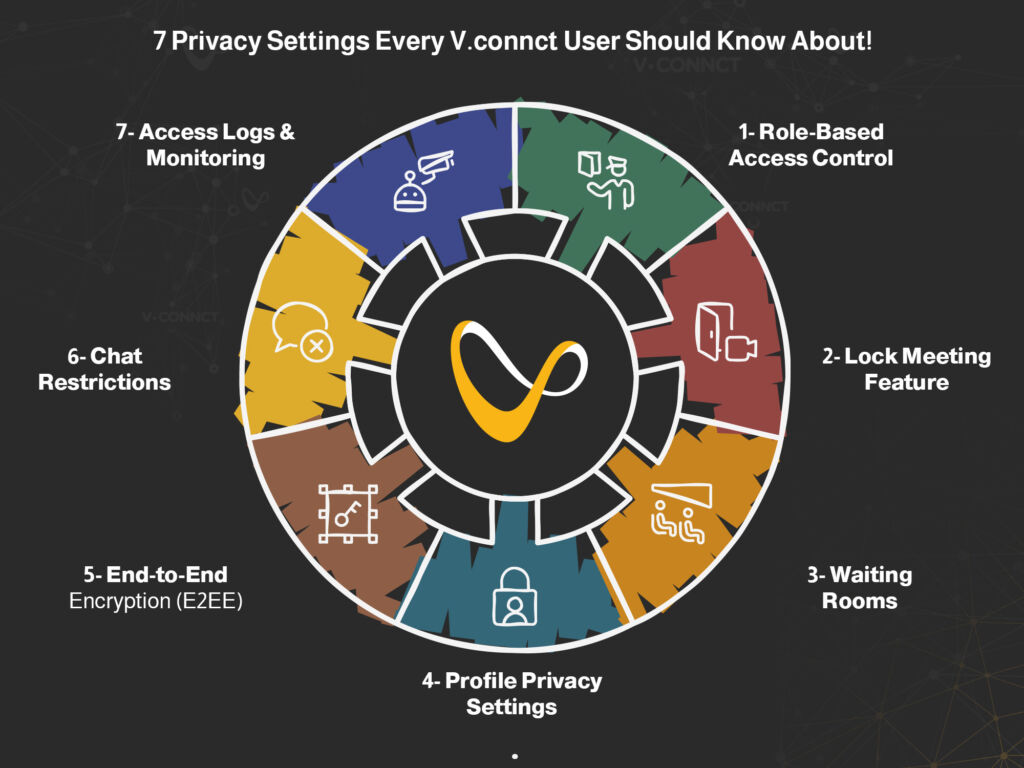
    7 Privacy Settings Every V.connct User Should !Know About

    Whether you’re hosting high-stakes business meetings or virtual classrooms, the ability to control who joins, what they see, and how they interact is essential. V.connct was designed with this in mind, offering robust privacy settings that empower users and admins alike. In this article, we’ll walk you through 7 powerful privacy settings in V.connct that help you create safer, more controlled virtual spaces without compromising collaboration or ease of use.

    Privacy Settings

    1. Role-Based Access Control

    Assign roles like Moderator, Presenter, or Viewer to limit who can share screens, speak, or invite others. This keeps the meeting structure intact and prevents misuse.

     2. Lock Meeting Feature

    Once a meeting begins, hosts can lock it, preventing anyone else from joining, even if they have the link.

    3. Waiting Rooms

    Meetings can begin with a waiting room, giving hosts time to vet and approve attendees before admitting them.

    4. Profile Privacy Settings

    Control how much profile information is visible to others. Users can hide details like email or full name, ideal for external meetings.

     5. End-to-End Encryption (E2EE)

    All messages, files, and video streams are encrypted from sender to receiver, ensuring no unauthorized access, including from V.connct itself.

    6. Chat Restrictions

    Moderators can restrict who can chat, when, and whether private messaging is allowed. This prevents misuse or distractions during sessions.

     7. Access Logs & Monitoring

    Admins have access to detailed logs of join/leave activity and role changes, helping them audit usage and identify issues in real time.

    Security begins with awareness. These 7 privacy settings give you full control over how your meetings are run, who participates, and how data is shared.

    Try V.connct for Free or Book a Demo today to explore these features in action.

  • التشفير من الطرف إلى الطرف في V.connct: لماذا هو مهم؟

    التشفير من الطرف إلى الطرف في V.connct: لماذا هو مهم؟

    في عصر تتزايد فيه مخاطر اختراق البيانات والمراقبة، أصبحت حماية محادثات فريقك أولوية قصوى. وقد تم تطوير منصة V.connct بناءً على مبدأ الخصوصية أولًا، ويُعد التشفير من الطرف إلى الطرف أحد الركائز الأساسية لهذا النهج.

    إليك كيف يعمل ولماذا هو ضروري لمؤسستك.

    ما هو التشفير من الطرف إلى الطرف؟

    1. ما هو التشفير من الطرف إلى الطرف؟

    التشفير من الطرف إلى الطرف يعني أن محتوى الاجتماع، بما في ذلك الفيديو والصوت والرسائل والملفات، يتم تشفيره على جهاز المرسل ولا يُفك تشفيره إلا على جهاز المستلم. لا يمكن لأي جهة، بما في ذلك V.connct نفسها، الاطلاع على البيانات أثناء نقلها أو تخزينها.

    وهذا يختلف عن التشفير التقليدي الذي قد يتيح لمزود الخدمة إمكانية الوصول إلى البيانات.

    2. كيف تطبق V.connct التشفير من الطرف إلى الطرف (E2EE)

    •  توليد المفاتيح على مستوى الجهاز
      يتم توليد مفاتيح تشفير فريدة لكل جلسة مباشرة على أجهزة المستخدمين، ولا يتم إرسالها أو تخزينها على خوادم V.connct أبدًا.
    •  تبادل المفاتيح عبر قنوات مشفرة
      يتم تبادل المفاتيح عبر بروتوكولات تشفير آمنة تضمن أن المشاركين الموثوقين فقط يمكنهم الانضمام إلى الاجتماع المشفر.
    •  تشفير الرسائل والملفات
      إلى جانب الفيديو والصوت، يتم أيضًا تشفير الرسائل والملفات المشتركة من الطرف إلى الطرف لضمان السرية التامة.

    3. لماذا هذا مهم لفريقك؟

    •  ضمان الخصوصية: سواء كنت تناقش سجلات طبية، أو خطط عمل، أو بيانات طلاب، تظل محادثاتك محمية.
    •  الامتثال للوائح: يساعد E2EE في V.connct المؤسسات على الالتزام بالقوانين مثل GDPR وHIPAA.
    •  بناء الثقة: المحادثات المشفرة تعزز ثقة العملاء والشركاء والموظفين في أمان التواصل.

    4. التشفير من الطرف إلى الطرف قيد التطبيق: ميزات داعمة في V.connct

    • غرف جانبية مشفرة
    • تحكم في صلاحيات المشاركة حسب الدور
    • صلاحيات دخول عن طريق روابط مؤقتة وتوثيق الدعوات
    • لا يتم فك التشفير على الخوادم في أي مرحلة

    5. التزامنا بأمان التواصل

    في V.connct، الأمان ليس خيارًا إضافيًا، بل أساس كل تطوير. يتم التركيز على الأداء وسهولة الاستخدام في كل تحديث، حتى يتمكن فريقك من التعاون بثقة دون التنازل عن الخصوصية.

    جرب نظام V.connct الآمن الآن

    من الاجتماعات المشفرة إلى أدوات التعاون التي تركز على الخصوصية، تقدم V.connct كل ما تحتاجه لحماية تواصلك.

    جرّب V.connct مجانًا أو احجز عرضًا توضيحيًا مع فريقنا اليوم.

  • Top 5 Bug Fixes from V.connct That Boost Forecast Accuracy

    Top 5 Bug Fixes from V.connct That Boost Forecast Accuracy

    At V.connct, we know that small bugs can lead to big disruptions, especially when it comes to planning meetings, scheduling calls, or forecasting team activities. That’s why we’re continuously improving our system to ensure every feature delivers with precision. In our most recent set of releases, we addressed critical bugs that were affecting forecast reliability and user experience.

    Let’s take a closer look at what’s been fixed and how it directly improves your team’s performance and planning.

    Key Bug Fixes That Enhance Forecast Accuracy

     1. Mobile Fixes for Time Zone Drift

    Release: Mobile App v8.0.7
    Bug fixes in how meeting times were displayed across devices now ensure consistent time zone handling. This is crucial for teams scheduling cross-region sessions or forecasting availability windows accurately.

     2. Web App Speed & Data Sync Fixes

    Release: Website v6.2.0
    Inaccurate loading of meeting statistics and user engagement data has been resolved. This enables more reliable dashboards and historical reports, improving forecast precision.

     3. AI Prediction Engine Optimization

    Release: Desktop v3.0 Update
    Bug fixes within the new engine have resolved incorrect session pattern calculations. This update improves how the system interprets past behaviors for smarter future scheduling and analytics.

    4. Dashboard Display Corrections

    User-reported issues like metrics misalignment or broken graphs have been addressed, ensuring better visualization of key data points used for forecasting attendance, usage trends, or workload.

    5. Data Export Reliability

    Several bugs in CSV/Excel export across platforms were fixed, ensuring accurate data extraction for offline analysis or strategic planning.

    Why This Matters to You

    Whether you’re managing workforce schedules, preparing executive meetings, or analyzing product adoption, precision matters. These bug fixes ensure that:

    • Your team gets the right time, every time
    • Dashboard metrics reflect real user data
    • Meeting stats support accurate forecasting
    • Mobile reliability matches desktop power
    bug fixes
    bug fixes

    Try the New V.connct Today

    We’re constantly improving to help you plan better and scale faster.
    Explore the upgraded platform and see how the new fixes can enhance your team’s performance.

    Try V.connct for Free or Book a Demo

  • 5 إصلاحات الأخطاء من V.connct حسّنت التخطيط المستقبلي بدقة أعلى

    5 إصلاحات الأخطاء من V.connct حسّنت التخطيط المستقبلي بدقة أعلى

    في V.connct، نعلم أن الأخطاء الصغيرة قد تسبب اضطرابات كبيرة، خصوصًا عند تخطيط الاجتماعات، أو جدولة المهام، أو توقع نشاط الفرق. ولهذا نعمل باستمرار على تحسين النظام من خلال تنفيذ إصلاحات الأخطاء لضمان أن كل ميزة تعمل بأقصى دقة. في أحدث الإصدارات، قمنا بحل عدد من المشكلات الجوهرية التي أثرت على دقة التخطيط المستقبلي وتجربة المستخدم.

    دعونا نستعرض أبرز هذه الإصلاحات وكيف أثرت بشكل مباشر على أداء الفرق وتحسين التخطيط.

    أهم إصلاحات الأخطاء التي حسنت دقة التخطيط المستقبلي

    1. إصلاحات التطبيق الموبايل الخاصة بفروقات المناطق الزمنية

    الإصدار: تطبيق الموبايل v8.0.7
    تم معالجة مشكلة اختلاف توقيت الاجتماعات بين الأجهزة المختلفة، مما يضمن عرض التوقيت بشكل موحد لجميع المستخدمين. وهذا أساسي للفرق التي تعمل عبر مناطق زمنية مختلفة وتحتاج إلى دقة في جدولة الاجتماعات.

    2. تحسين سرعة التطبيق على الويب ومزامنة البيانات

    الإصدار: الموقع الإلكتروني v6.2.0
    تم حل مشكلات بطء تحميل الإحصائيات أو عدم دقتها. أصبحت لوحات التحكم أكثر موثوقية، ويمكن الاعتماد على تقارير الأداء السابقة لتحسين التخطيط المستقبلي.

    3. تحسين محرك التخطيط المستقبلي المدعوم بالذكاء الاصطناعي

    الإصدار: سطح المكتب v3.0
    عالجنا خللاً في طريقة احتساب أنماط الجلسات داخل المحرك الجديد. ساعد هذا التحديث النظام على فهم السلوكيات السابقة بشكل أفضل وتقديم جداول مستقبلية وتحليلات أكثر دقة.

     4. تصحيح عرض البيانات على لوحة التحكم

    تم حل مشكلات تتعلق بعدم توافق المؤشرات أو تلف الرسوم البيانية، ما يتيح عرضًا أوضح للنقاط البيانية الرئيسية المستخدمة في تحليل الحضور واستخدام النظام وأعباء العمل.

    5. تحسين موثوقية تصدير البيانات

    تم إصلاح عدد من مشكلات تصدير الملفات بصيغة CSV/Excel، مما يضمن استخراج بيانات دقيقة لتحليلها أو استخدامها في تقارير خارجية.

    لماذا يهمك هذا؟

    سواء كنت تدير جداول فرق العمل، أو تحضر اجتماعات إدارية، أو تحلل استخدام منتجك، فإن الدقة أمر لا يمكن التهاون فيه. هذه الإصلاحات تضمن أن:

    •  فريقك يحصل على التوقيت الصحيح دائمًا
    •  مؤشرات لوحة التحكم تعكس بيانات حقيقية
    •  بيانات الاجتماعات تدعم التخطيط المستقبلي الدقيق
    •  أداء التطبيق على الموبايل يعادل قوة سطح المكتب
    إصلاحات الأخطاء
    إصلاحات الأخطاء

    جرب V.connct الآن!

    نحن نواصل العمل على تطوير المنصة لمساعدتك في التخطيط الأفضل والنمو الأسرع.
    استكشف النسخة المحدثة وشاهد بنفسك كيف تعزز هذه الإصلاحات من أداء فريقك.

     جرب V.connct مجانًا أو احجز جلسة تجريبية مع فريقن

  • اختراق الاجتماعات | 5 طرق تحمي بها V.connct فريقك

    اختراق الاجتماعات | 5 طرق تحمي بها V.connct فريقك

    في V.connct، نضع أمان محادثات فريقك في صدارة أولوياتنا. اختراق الاجتماعات، أو انضمام مشاركين غير مرغوب بهم، يمكن أن يُفسد جلسات مهمة، يكشف معلومات حساسة، ويقلل الثقة في النظام. لهذا السبب، قمنا بتطوير مجموعة شاملة من الأدوات والسياسات للحفاظ على سلاسة الاجتماعات وسلامتها.

    اختراق الاجتماعات | 5 طرق تحمي بها V.connct فريقك
    اختراق الاجتماعات | 5 طرق تحمي بها V.connct فريقك

    أدوات V.connct لحماية اجتماعاتك: 5 طرق فعالة لمنع اختراق الاجتماعات

    في زمن العمل عن بُعد، لم يعد اختراق الاجتماعات مجرد إزعاج عابر، بل تهديد حقيقي للخصوصية والمهنية. لحسن الحظ، توفر منصة V.connct مجموعة متقدمة من الأدوات التي تضمن أقصى درجات الأمان لكل اجتماع افتراضي.

    1. غرف الانتظار للتحقق قبل بدء الاجتماع

    في V.connct، يمكنك تفعيل “غرف الانتظار” كخط دفاع أول قبل بدء أي اجتماع. تُعد هذه الغرفة الافتراضية منطقة مؤقتة لا يُسمح فيها بالدخول الفوري، بل ينتظر فيها المشاركون حتى يقوم المضيف بمراجعة هوياتهم يدويًا والتأكد من أحقيتهم في الانضمام.
    تُستخدم هذه الميزة لتقليل احتمالية انضمام أشخاص غير مصرح لهم، خاصة في الاجتماعات الحساسة التي تتضمن معلومات خاصة أو سرية. كما يمكن تخصيص رسالة ترحيبية داخل غرفة الانتظار لطمأنة المشاركين الشرعيين، وإعلامهم بأن عملية تحقق تتم حفاظًا على أمان الاجتماع.

    غرفة الانتظار تُشبه بوابة تفتيش أمنية رقمية، لا أحد يدخل قبل التأكد من أنه ينتمي فعلًا إلى الاجتماع.

    2. قفل الاجتماعات لمنع الدخول المتأخر

    في منصة V.connct، بمجرد بدء الاجتماع يمكنك استخدام خاصية “قفل الاجتماع” لإغلاق باب الانضمام تمامًا حتى لو كان لدى الشخص رابط الدعوة أو تم إضافته سابقًا.
    تُعد هذه الميزة مثالية للاجتماعات التي تتطلب تركيزًا عاليًا أو تلك التي تتناول معلومات سرية، حيث تمنع أي إرباك أو اختراق محتمل قد يحدث نتيجة انضمام متأخر أو غير مخطط له.

    يمكن للمُضيف تفعيل القفل بنقرة واحدة من لوحة التحكم داخل الاجتماع، مع إبقاء المشاركين الحاليين فقط نشطين. وإذا حاول شخص الانضمام بعد القفل، فسيظهر له إشعار بأن الاجتماع مغلق، دون إمكانية التسلل أو إرسال إشعار للمضيف.

    فكر فيها كمفتاح رقمي تغلق به باب الاجتماع وتحتفظ بالتحكم الكامل بمن في الداخل.

    3. صلاحيات تستند إلى الدور للتحكم الكامل

    واحدة من أبرز ميزات الأمان في V.connct هي إمكانية تعيين أدوار محددة لكل مشارك في الاجتماع، مثل “مُقدِّم”، “مشاهد”، أو “مساعد إداري”.
    يتيح ذلك للمضيفين تخصيص صلاحيات دقيقة لكل دور من يستطيع فتح الميكروفون، أو مشاركة الشاشة، أو إرسال رسائل في الدردشة، وحتى من يمكنه تسجيل الجلسة.

    هذه الخاصية لا تمنح فقط تجربة منظمة واحترافية، بل تُعد أداة حيوية لمنع أي استخدام غير مصرح به أو سلوك تخريبي.
    في الاجتماعات الحساسة، يكون لديك السيطرة الكاملة على من يشارك، ومن يكتفي بالمشاهدة، دون الحاجة للتدخل المستمر.

    باختصار: أنت من يضع القواعد والمنصة تلتزم بتنفيذها بدقة.

    4. تشفير كامل للمحادثات

    في V.connct، تتم حماية الاجتماعات بتقنية التشفير من طرف إلى طرف (End-to-End Encryption)، ما يعني أن المحادثات لا تكون مرئية لأي طرف خارجي ولا حتى لفريق الدعم أو الخوادم الخاصة بالمنصة.
    كل ما يُقال أو يُعرض داخل الاجتماع يظل محصورًا فقط بين المشاركين المعنيين. هذه الطبقة المتقدمة من التشفير تمنع أي محاولة لاعتراض البيانات أو التجسس عليها، وهو ما يجعل V.connct خيارًا مثاليًا للاجتماعات الحساسة في القطاعات الحكومية، الصحية، والتعليمية.

    عندما نقول خصوصيتك محمية فنحن نعني ذلك حرفيًا.

    5. أدوات مراقبة فورية وإبلاغ عن الانتهاكات

    حتى مع أفضل أنظمة الحماية، قد تحدث محاولات نادرة لاختراق أو إساءة استخدام. وهنا تأتي قوة V.connct في منح المضيف أدوات استجابة سريعة.
    يمكنك كمضيف إزالة أي مشارك غير مرغوب فيه بضغطة زر، وإرسال بلاغ فوري لفريق الدعم عن أي سلوك مريب أو انتهاك أمني.
    يتم حفظ هذه البلاغات وتحليلها للمساهمة في تحسين النظام باستمرار، وتوفير تجربة أكثر أمانًا مستقبلاً.

    هذه ليست مجرد إجراءات طارئة، بل نظام مراقبة ذكي يجعل الأمان جزءًا مدمجًا في كل اجتماع.

    لماذا يُعتبر منع اختراق الاجتماعات أمراً ضرورياً؟

    في عالم رقمي يعتمد على الاجتماعات الافتراضية، لا يحتاج الأمر لأكثر من اختراق واحد لزعزعة ثقة المشاركين، تعطيل سير العمل، أو حتى تسريب معلومات حساسة.
    سواء كنت تدير صفًا دراسيًا، جلسة حكومية، أو اجتماعًا تنفيذيًا، فإن تعرض الجلسة لاختراق قد يؤدي إلى عواقب قانونية، وإحراج مؤسسي، وخسائر مهنية يصعب تداركها.

    لهذا السبب، لم يعد تأمين الاجتماعات رفاهية بل ضرورة استراتيجية لضمان الاستمرارية، والاحترام، والمصداقية.

    اختر الأمان والطمأنينة مع V.connct

    الأمان ليس مجرد خيار إضافي، بل جزء أساسي من تجربة V.connct. من التحكم الدقيق في الصلاحيات إلى الأدوات اللحظية، صُممت منصتنا لحماية اجتماعاتك والحفاظ على تركيز فريقك.

     جرّب V.connct مجانًا أو احجز عرضًا توضيحيًا مع فريقنا اليوم.

  • Avoid Meeting Bombing: 5 Security Features from V.connct

    Avoid Meeting Bombing: 5 Security Features from V.connct

    At V.connct, ensuring the safety of your team’s conversations is a top priority. Meeting bombing, also known as unwanted participant intrusion, can derail important sessions, expose confidential information, and damage user trust. That’s why we’ve developed a comprehensive set of tools and policies designed to prevent disruptions and maintain meeting integrity.

    Meeting bombing
    Meeting bombing

    Here’s how V.connct helps you stay protected:

    1. Waiting Rooms for Pre-Meeting Verification

    Every meeting in V.connct can be set to include a virtual waiting room. This allows moderators to review and admit only approved participants. Think of it as a security checkpoint; no one gets in unless they belong.

    2. Lockable Meetings to Prevent Late Intrusions

    Once your meeting starts, you can lock it, just as you would close a physical door. This prevents any new participants from joining unexpectedly, even if they have the link.

    3. Role-Based Permissions for Maximum Control

    V.connct allows hosts to assign roles, such as Moderator, Presenter, or Viewer, each with specific permissions. Only authorized users can unmute themselves, share screens, or use chat, eliminating potential abuse from unknown attendees.

    4. End-to-end encryption for Private Conversations

    All meetings are protected with end-to-end encryption, ensuring no one, including V.connct, can access your conversation content. It’s a privacy-first design in action.

    5. Real-Time Monitoring & Reporting Tools

    In the rare case a meeting is disrupted, hosts can instantly remove participants and report abuse through the platform. This allows for swift action and helps improve the system for future meetings.

    Why Meeting Bombing Prevention Is Essential

    A single disruption can waste time, reduce trust, and pose compliance risks. Whether you’re in education, government, or enterprise settings, a secure platform protects your team’s productivity and your organization’s reputation.

    Choose Peace of Mind with V.connct

    Security isn’t just a checkbox, it’s part of the V.connct experience. From granular access settings to real-time controls, our platform is built to keep your meetings protected and your team focused.

     Try V.connct for Free or Book a Demo with Our Team Today

  • Call Center Workforce Management: Best Practices and Tips

    Call Center Workforce Management: Best Practices and Tips

    Running a successful call center is about more than just answering calls; it’s about managing people, processes, and performance in real time. That’s why call center workforce management has become essential for companies aiming to deliver efficient, scalable customer service. In this article, we’ll share the top practices and expert tips to help you improve agent performance, reduce costs, and boost customer satisfaction.

    What Is Call Center Workforce Management?

    Call center workforce management (WFM) refers to the strategies, tools, and processes used to plan, track, and optimize the performance of customer service agents. It typically includes:

    • Forecasting call volume
    • Scheduling agents
    • Monitoring adherence and productivity
    • Managing breaks, shift swaps, and leave
    • Real-time and historical performance analysis

    A good WFM system ensures the right number of agents are in place to handle demand without overstaffing or underdelivering.

    Best Practices for Effective Call Center Workforce Management

    1. Leverage Historical and Real-Time Data

    Use a combination of historical call patterns and real-time data to forecast staffing needs. AI-powered systems can help you predict volume spikes and reduce wait times.

    2. Optimize Agent Scheduling with Flexibility

    Allowing agents to bid for shifts, submit availability, and swap shifts gives them more control, while still keeping schedules aligned with service goals.

    3. Monitor Adherence, Not Just Attendance

    Attendance is important, but adherence, whether agents are following their scheduled activities, is a more accurate measure of performance.

    4. Use Dashboards to Track Real-Time KPIs

    Dashboards give supervisors visibility into metrics like average handle time, queue length, and customer satisfaction, allowing them to act quickly when issues arise.

    5. Don’t Neglect Agent Engagement

    Engaged agents deliver better customer service. Recognize performance, offer development opportunities, and collect feedback regularly to keep morale high.

    Key Features to Look For in a Call Center WFM Platform

    When choosing a tool like V.connct, make sure it offers:

    • AI-based forecasting and smart scheduling
    • Real-time performance monitoring
    • Shift bidding and automated approvals
    • Mobile app for agent flexibility
    • Role-based access controls

    Why It Matters Now More Than Ever

    With customer expectations rising and hybrid work becoming the norm, call centers need agile workforce management solutions. A smart WFM system empowers teams to be responsive, data-driven, and human-centered, all at once.

    Ready to Optimize Your Call Center?

    Discover how V.connct helps you streamline operations, forecast smarter, and support happier teams.
    Try V.connct for Free or Book a Demo today.